> ## Documentation Index
> Fetch the complete documentation index at: https://docs.skyhook.io/llms.txt
> Use this file to discover all available pages before exploring further.
# Environments
> Manage deployment environments at the organization level — cluster, namespace, labels, clone-from-source, AutoDeploy, and per-workload env name prefixes.
Environments in Skyhook are **org-level** resources that define *where* a service or job runs — a cluster, a namespace, a region, and a set of labels you can use to group things. Services and jobs reference environments by name; a single environment can host many workloads, and a single workload can deploy to many environments.
This page covers the **Environments** section in the sidebar where you manage the environments themselves. For deploying into them, see [Deploying Services](/application/services/deploy). For ephemeral/PR-preview environments, see [Preview Environments](/application/environments/preview).
## Environments list
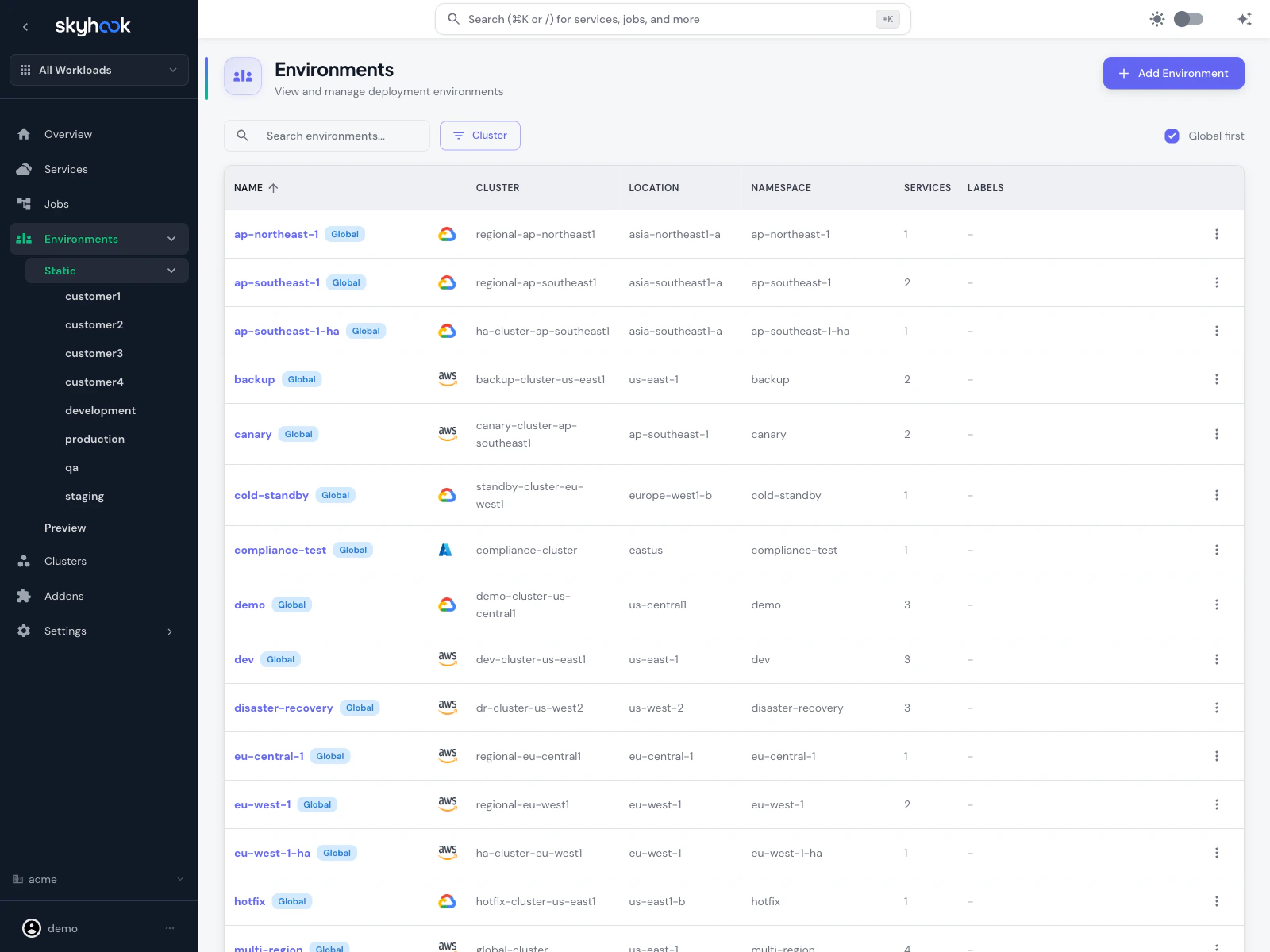 Navigate to **Environments** in the sidebar. The list shows every environment in your org in a sortable, searchable table with:
* **Name** — the environment identifier (e.g. `dev`, `prod`, `staging`, `ap-northeast-1`)
* **Cluster** — target cluster with provider icon (AWS, GCP, Azure)
* **Location** — the cluster's region/zone
* **Namespace** — Kubernetes namespace
* **Services** — count of services currently deployed
* **Labels** — tags applied to this environment
**Global** badges mark environments that aren't tied to a specific service — they're available for any workload to deploy to. Environments without the Global badge are scoped to a particular service.
### Searching and filtering
* **Search** box matches on name, cluster, namespace
* **Cluster** dropdown filters to environments on a specific cluster
* Column headers are sortable
* Rows per page is configurable (default 50)
The sidebar also groups environments by **Static** (persistent), **Preview** (ephemeral), and the specific environment names so you can click straight into the environment deployment page.
## Creating an environment
Click **Add Environment** in the top-right. Skyhook opens a create dialog.
Navigate to **Environments** in the sidebar. The list shows every environment in your org in a sortable, searchable table with:
* **Name** — the environment identifier (e.g. `dev`, `prod`, `staging`, `ap-northeast-1`)
* **Cluster** — target cluster with provider icon (AWS, GCP, Azure)
* **Location** — the cluster's region/zone
* **Namespace** — Kubernetes namespace
* **Services** — count of services currently deployed
* **Labels** — tags applied to this environment
**Global** badges mark environments that aren't tied to a specific service — they're available for any workload to deploy to. Environments without the Global badge are scoped to a particular service.
### Searching and filtering
* **Search** box matches on name, cluster, namespace
* **Cluster** dropdown filters to environments on a specific cluster
* Column headers are sortable
* Rows per page is configurable (default 50)
The sidebar also groups environments by **Static** (persistent), **Preview** (ephemeral), and the specific environment names so you can click straight into the environment deployment page.
## Creating an environment
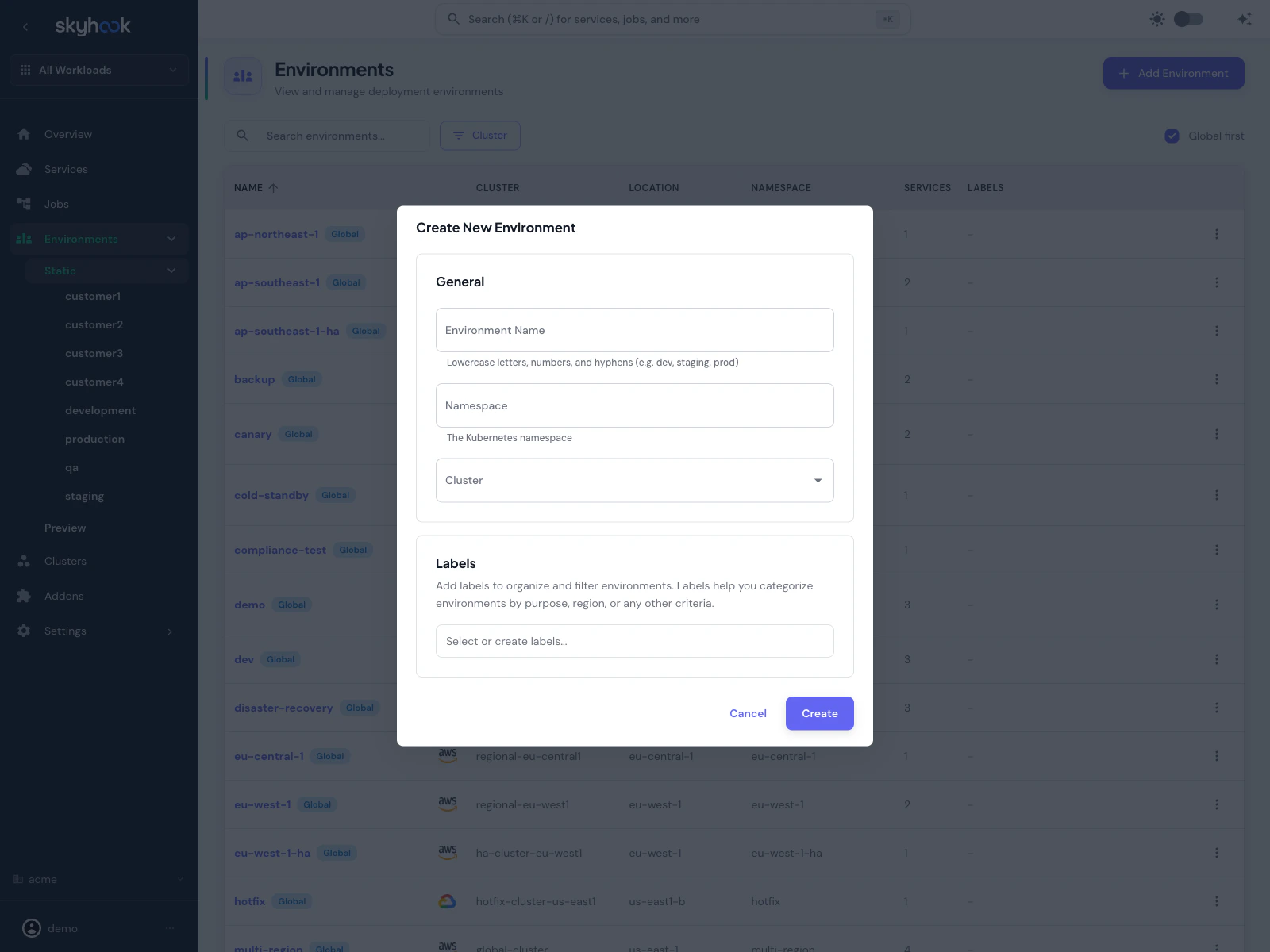
Click **Add Environment** in the top-right. Skyhook opens a create dialog.
 ### Fields
**General:**
* **Environment Name** — lowercase letters, numbers, and hyphens only (e.g. `dev`, `staging`, `prod`). Used everywhere the environment is referenced.
* **Namespace** — the Kubernetes namespace. Defaults to the environment name if left empty.
* **Cluster** — target cluster. Clusters come from **Infrastructure > Clusters**.
**Labels:**
* **Labels** — free-form labels for grouping environments. Labels don't affect deployment — they're used for filtering and for label-based deploy rules (see below).
### Clone configuration from another environment
When creating a new environment, you can **clone** deployment configuration from an existing environment to avoid retyping settings. The clone section appears below Labels once you pick a source environment.
Clonable sections:
* **Deployment strategy** (RollingUpdate, Recreate, etc.)
* **Pod resources** (CPU/memory requests and limits)
* **Autoscaling** (HPA thresholds, replica counts)
* **Health checks** (liveness, readiness, startup probes)
* **ArgoCD configuration** — sync policy, destination overrides
Only sections that *have* configuration in the source environment are shown as available — nothing is cloned blindly.
Cloning is particularly useful when adding a new region or customer environment: clone from an existing prod-like environment and then adjust the cluster and namespace. Base + patches stay consistent with your existing setup.
Click **Create**. Skyhook opens a pull request against your deployment repository adding the new environment; ArgoCD applies it after merge. A confirmation banner shows the pull request URL and offers a **Review PR** button to review and merge it in-app ([more on branches and PRs](/infrastructure/gitops/branches-and-prs)).
## Labels and label-based deployments
Labels are the primary way to organize environments at scale. Common uses:
* **Region** — `region:us-east`, `region:eu-west`
* **Role** — `role:canary`, `role:ha`
* **Team** — `team:payments`, `team:analytics`
* **Lifecycle** — `lifecycle:temporary`, `lifecycle:production`
### Filtering by label
The environment label picker (in the services deploy tab, the deployments list page, and the org environments page) lets you:
* Select one or more environments by name
* Or select one or more labels — every environment matching any selected label is included
This lets you do things like *"deploy this new image to every environment labeled `role:canary`"* without listing them individually.
### Label-based deployments
When deploying a service, the environment picker has two tabs:
* **Environments** — pick specific environments to deploy to
* **Labels** — pick one or more labels, and Skyhook deploys to every environment that matches
This is the fastest way to roll out to a fleet of regional or customer environments without selecting each one individually.
### Filtering the deployment list
The deployments list page (per service) has a label filter in addition to the environment name filter — so you can see "all deployments to environments labeled `region:us-east`" across time.
## AutoDeploy
Environments can be marked as **auto-deploy targets**, meaning every new commit/image build automatically deploys without manual intervention.
Two levels:
* **Service-level AutoDeploy** — set on a specific environment within a service's environments tab. Only that service auto-deploys.
* **Global environment AutoDeploy** — set on a **Global** environment from the context menu on the environments list page. Every service using that global environment auto-deploys.
To toggle global AutoDeploy: right-click an environment row (or use the **⋮** context menu) and pick **Set as Auto-deploy** or **Disable Auto-deploy**. A **🚀 rocket icon** displays next to environments that have AutoDeploy enabled so you can see the state at a glance.
Global AutoDeploy affects *every service* deploying to that environment. Make sure that's actually what you want — accidentally enabling AutoDeploy on `prod` will start pushing every build to production.
The AutoDeploy action opens a PR, tracked with the same pending PR indicator as other environment changes.
## Environment name prefix
For cases where you want to run multiple instances of the same workload in the same Kubernetes namespace — think multi-tenant apps, customer-specific deployments — you can enable **environment name prefixing** to disambiguate Kubernetes resource names.
Toggle **Enable environment name prefix** on the service's **Settings > Deployment** tab (or the job's **Settings > General** tab). When enabled, Kubernetes resources are named `-` instead of just ``:
* Deployment: `dev-my-service` instead of `my-service`
* Service: `dev-my-service` instead of `my-service`
* ConfigMap / Secret: `dev-my-service` prefix
* Ingress: `dev-my-service` prefix
This lets `dev-my-service` and `staging-my-service` coexist in the same namespace without colliding.
If you use one namespace per environment (the default pattern), you don't need environment name prefixing. It's mainly useful for multi-tenant setups where per-customer environments share a namespace.
## Environment settings beyond the basics
The basic create dialog covers name/namespace/cluster/labels. Each environment has additional settings you can edit after creation:
* **Ingress** — enable ingress, ingress host, ingress class
* **Deployment strategy** — RollingUpdate, Recreate, with max surge / max unavailable
* **Pod resources** — CPU/memory requests and limits
* **Autoscaling** — HPA targets (see [Autoscaling](/application/services/autoscaling))
* **Health checks** — liveness, readiness, startup probes
* **ArgoCD config** — destination cluster, sync policy, ignore differences
Most of these are on the service's **Environments** tab when you select the environment, so they can vary per service even when the environment itself is shared.
## Per-environment env vars and secrets
Environments can override env vars and secrets on a per-service basis. Two layers:
* **Base env vars** defined on the service apply to every environment by default
* **Environment overrides** apply only when that environment is selected
Change environment-specific values on the service's **Env Vars & Secrets** tab by selecting the relevant environment from the dropdown. See [Secrets Management](/application/services/envvars-secrets) for details.
## Deleting environments
From the environments list, select one or more rows and click **Delete** (or use the context menu on a single row). Skyhook opens a PR removing the environment from the deployment repo; ArgoCD prunes resources on sync.
Bulk delete is supported — tick the checkboxes on multiple rows and delete them all in one PR.
Deleting a static environment does **not** delete the Kubernetes namespace by default — resources are pruned but the namespace persists. If you want the namespace gone too, delete it manually via kubectl or the cluster resource viewer.
## Troubleshooting
Skyhook needs a connected cluster and a deployment repository to write environment manifests. The gate shows a checklist: **Connect a Kubernetes cluster** (covered by [Connecting Clusters](/infrastructure/clusters/connecting-clusters)) and **Configure a deployment repository** (Settings → Code & Repositories). Once both are done, the environments list appears.
When you enable the environment name prefix, the default ingress host is regenerated using the new prefixed service name. Custom ingress hosts are preserved; if you were relying on the auto-generated host, update it in the environment's Ingress settings.
### Fields
**General:**
* **Environment Name** — lowercase letters, numbers, and hyphens only (e.g. `dev`, `staging`, `prod`). Used everywhere the environment is referenced.
* **Namespace** — the Kubernetes namespace. Defaults to the environment name if left empty.
* **Cluster** — target cluster. Clusters come from **Infrastructure > Clusters**.
**Labels:**
* **Labels** — free-form labels for grouping environments. Labels don't affect deployment — they're used for filtering and for label-based deploy rules (see below).
### Clone configuration from another environment
When creating a new environment, you can **clone** deployment configuration from an existing environment to avoid retyping settings. The clone section appears below Labels once you pick a source environment.
Clonable sections:
* **Deployment strategy** (RollingUpdate, Recreate, etc.)
* **Pod resources** (CPU/memory requests and limits)
* **Autoscaling** (HPA thresholds, replica counts)
* **Health checks** (liveness, readiness, startup probes)
* **ArgoCD configuration** — sync policy, destination overrides
Only sections that *have* configuration in the source environment are shown as available — nothing is cloned blindly.
Cloning is particularly useful when adding a new region or customer environment: clone from an existing prod-like environment and then adjust the cluster and namespace. Base + patches stay consistent with your existing setup.
Click **Create**. Skyhook opens a pull request against your deployment repository adding the new environment; ArgoCD applies it after merge. A confirmation banner shows the pull request URL and offers a **Review PR** button to review and merge it in-app ([more on branches and PRs](/infrastructure/gitops/branches-and-prs)).
## Labels and label-based deployments
Labels are the primary way to organize environments at scale. Common uses:
* **Region** — `region:us-east`, `region:eu-west`
* **Role** — `role:canary`, `role:ha`
* **Team** — `team:payments`, `team:analytics`
* **Lifecycle** — `lifecycle:temporary`, `lifecycle:production`
### Filtering by label
The environment label picker (in the services deploy tab, the deployments list page, and the org environments page) lets you:
* Select one or more environments by name
* Or select one or more labels — every environment matching any selected label is included
This lets you do things like *"deploy this new image to every environment labeled `role:canary`"* without listing them individually.
### Label-based deployments
When deploying a service, the environment picker has two tabs:
* **Environments** — pick specific environments to deploy to
* **Labels** — pick one or more labels, and Skyhook deploys to every environment that matches
This is the fastest way to roll out to a fleet of regional or customer environments without selecting each one individually.
### Filtering the deployment list
The deployments list page (per service) has a label filter in addition to the environment name filter — so you can see "all deployments to environments labeled `region:us-east`" across time.
## AutoDeploy
Environments can be marked as **auto-deploy targets**, meaning every new commit/image build automatically deploys without manual intervention.
Two levels:
* **Service-level AutoDeploy** — set on a specific environment within a service's environments tab. Only that service auto-deploys.
* **Global environment AutoDeploy** — set on a **Global** environment from the context menu on the environments list page. Every service using that global environment auto-deploys.
To toggle global AutoDeploy: right-click an environment row (or use the **⋮** context menu) and pick **Set as Auto-deploy** or **Disable Auto-deploy**. A **🚀 rocket icon** displays next to environments that have AutoDeploy enabled so you can see the state at a glance.
Global AutoDeploy affects *every service* deploying to that environment. Make sure that's actually what you want — accidentally enabling AutoDeploy on `prod` will start pushing every build to production.
The AutoDeploy action opens a PR, tracked with the same pending PR indicator as other environment changes.
## Environment name prefix
For cases where you want to run multiple instances of the same workload in the same Kubernetes namespace — think multi-tenant apps, customer-specific deployments — you can enable **environment name prefixing** to disambiguate Kubernetes resource names.
Toggle **Enable environment name prefix** on the service's **Settings > Deployment** tab (or the job's **Settings > General** tab). When enabled, Kubernetes resources are named `-` instead of just ``:
* Deployment: `dev-my-service` instead of `my-service`
* Service: `dev-my-service` instead of `my-service`
* ConfigMap / Secret: `dev-my-service` prefix
* Ingress: `dev-my-service` prefix
This lets `dev-my-service` and `staging-my-service` coexist in the same namespace without colliding.
If you use one namespace per environment (the default pattern), you don't need environment name prefixing. It's mainly useful for multi-tenant setups where per-customer environments share a namespace.
## Environment settings beyond the basics
The basic create dialog covers name/namespace/cluster/labels. Each environment has additional settings you can edit after creation:
* **Ingress** — enable ingress, ingress host, ingress class
* **Deployment strategy** — RollingUpdate, Recreate, with max surge / max unavailable
* **Pod resources** — CPU/memory requests and limits
* **Autoscaling** — HPA targets (see [Autoscaling](/application/services/autoscaling))
* **Health checks** — liveness, readiness, startup probes
* **ArgoCD config** — destination cluster, sync policy, ignore differences
Most of these are on the service's **Environments** tab when you select the environment, so they can vary per service even when the environment itself is shared.
## Per-environment env vars and secrets
Environments can override env vars and secrets on a per-service basis. Two layers:
* **Base env vars** defined on the service apply to every environment by default
* **Environment overrides** apply only when that environment is selected
Change environment-specific values on the service's **Env Vars & Secrets** tab by selecting the relevant environment from the dropdown. See [Secrets Management](/application/services/envvars-secrets) for details.
## Deleting environments
From the environments list, select one or more rows and click **Delete** (or use the context menu on a single row). Skyhook opens a PR removing the environment from the deployment repo; ArgoCD prunes resources on sync.
Bulk delete is supported — tick the checkboxes on multiple rows and delete them all in one PR.
Deleting a static environment does **not** delete the Kubernetes namespace by default — resources are pruned but the namespace persists. If you want the namespace gone too, delete it manually via kubectl or the cluster resource viewer.
## Troubleshooting
Skyhook needs a connected cluster and a deployment repository to write environment manifests. The gate shows a checklist: **Connect a Kubernetes cluster** (covered by [Connecting Clusters](/infrastructure/clusters/connecting-clusters)) and **Configure a deployment repository** (Settings → Code & Repositories). Once both are done, the environments list appears.
When you enable the environment name prefix, the default ingress host is regenerated using the new prefixed service name. Custom ingress hosts are preserved; if you were relying on the auto-generated host, update it in the environment's Ingress settings.