> ## Documentation Index
> Fetch the complete documentation index at: https://docs.skyhook.io/llms.txt
> Use this file to discover all available pages before exploring further.
# Monorepos / Multiple Services in One Repo
Skyhook fully supports having multiple services or jobs in a single Git repository. Each service or job is identified by its path within the repository, enabling independent deployment while sharing code and infrastructure.
**What "monorepo" means in Skyhook:**
In Skyhook's context, "monorepo" simply means **multiple services/jobs in one Git repository**. When you have multiple services in one repo, Skyhook generates slightly different CI/CD workflows (using GitHub Actions matrix strategy) to build and deploy services independently.
This has **nothing to do with monorepo tools** like Nx or Turborepo - those are optional advanced features you can add later. See [Advanced Monorepo Tools](#advanced-monorepo-tools-nx-turborepo) for details.
**Deployment files:** Monorepos work with multiple deployment patterns:
* **In each service directory:** Deploy files alongside code (e.g., `services/api-gateway/deploy/`)
* **Dedicated directory in monorepo:** All deploy files in one place (e.g., `deploy/api-gateway/`, `deploy/user-service/`)
* **Separate deployment repository:** All services use a [centralized deployment repository](/application/repository/deployment-repositories) outside the code monorepo
All patterns work equally well. Choose based on your organization's preferences.
## What Skyhook Provides for Monorepos
Skyhook provides **full automated support** for organizing multiple services/jobs in a single repository:
* ✅ **Path-based service identification** - Each service lives in its own directory path
* ✅ **Matrix-based CI/CD workflows** - Builds all services in parallel when code changes (default behavior)
* ✅ **Independent image tags** - Each service gets its own Docker image tag and version
* ✅ **Independent deployments** - Deploy/promote services individually via Skyhook UI
* ✅ **Shared code** - All services can access common directories and packages
* ✅ **Automatic service registry** - Maintains `.skyhook/skyhook.yaml` listing all services and their environments
**Example structure:**
```
my-repository/
├── services/
│ ├── api-gateway/
│ │ ├── src/
│ │ ├── Dockerfile
│ │ ├── .koala.toml
│ │ └── deploy/ # K8s manifests
│ ├── user-service/
│ │ ├── src/
│ │ ├── Dockerfile
│ │ ├── .koala.toml
│ │ └── deploy/
│ └── payment-service/
│ ├── src/
│ ├── Dockerfile
│ ├── .koala.toml
│ └── deploy/
├── shared/
│ ├── lib/
│ └── utils/
└── .github/
└── workflows/
```
## Configuration in .koala.toml
The `.koala.toml` file contains the `Repo` section that specifies where code and deployment files live:
**Example 1: Monorepo with deploy files alongside each service**
```toml theme={"system"}
[Repo]
Name = "my-monorepo"
GitUser = "myorg"
URL = "https://github.com/myorg/my-monorepo"
Path = "services/api-gateway" # Service code location
IsMonorepo = true
# No DeploymentRepo = deploy files at Path location
```
**Example 2: Monorepo with dedicated deployment directory**
```toml theme={"system"}
[Repo]
Name = "my-monorepo"
GitUser = "myorg"
URL = "https://github.com/myorg/my-monorepo"
Path = "services/api-gateway" # Service code here
IsMonorepo = true
DeploymentRepo = "myorg/my-monorepo" # Same repo
DeploymentFolderPath = "deploy/api-gateway" # Deploy files here
```
**Example 3: Monorepo with centralized deployment repository**
```toml theme={"system"}
[Repo]
Name = "my-monorepo"
GitUser = "myorg"
URL = "https://github.com/myorg/my-monorepo"
Path = "apps/api-gateway" # Service code in monorepo
IsMonorepo = true
DeploymentRepo = "myorg/deployment" # Separate deployment repo
DeploymentFolderPath = "api-gateway" # Path in deployment repo
```
Skyhook manages these fields automatically based on your choices during
service/job creation. You typically don't need to edit them manually.
## Setting Up Your First Monorepo Service
### Step 1: Create Repository Structure
```bash theme={"system"}
# Create your monorepo
mkdir my-monorepo
cd my-monorepo
git init
# Create service directories
mkdir -p services/api-gateway/src
mkdir -p services/user-service/src
mkdir -p shared/lib
```
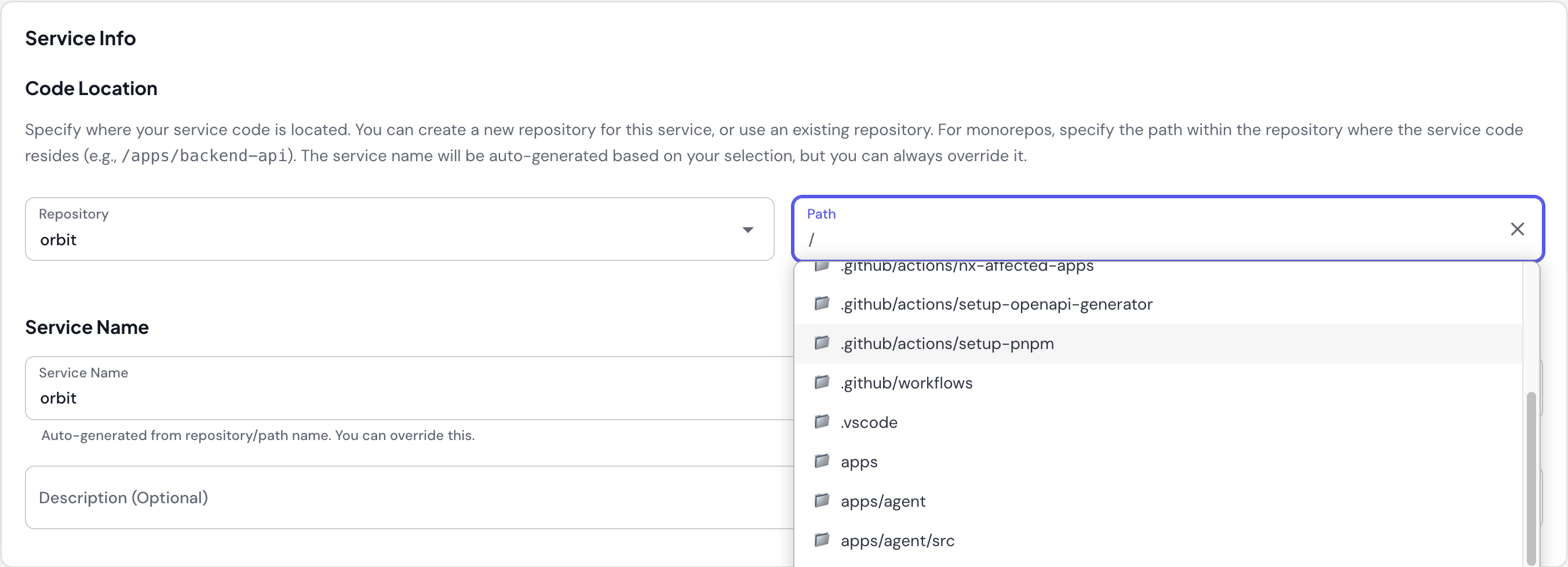
### Step 2: Create First Service in Skyhook
1. Navigate to **Services** → **Create New Service**
2. Select **"Monorepo"** for Service Repo Type
3. Choose repository: `my-monorepo` (or create new)
4. Specify path in repo: `services/api-gateway`
5. Service name auto-suggested: `api-gateway` (from path)
 ### Step 3: Skyhook Generates Files
Skyhook creates service-specific files at your specified path:
```
services/api-gateway/
├── src/ # Your application code
├── Dockerfile # Generated by Skyhook
├── .koala.toml # Service configuration
├── deploy/ # Kubernetes manifests
│ ├── base/
│ └── overlays/
└── .github/
└── workflows/
├── build_image.yml # Path-filtered to api-gateway
└── deploy.yml
```
### Step 4: Add More Services
Repeat the process for additional services:
1. **Create New Service**
2. Select **"Monorepo"** for Service Repo Type
3. Choose same repository: `my-monorepo`
4. Specify different path: `services/user-service`
5. Service name auto-suggested: `user-service`
Each service is added to `.skyhook/skyhook.yaml` and gets its own deployment config.
## Example: Language-Specific Monorepo (Go)
```
go-services/
├── go.mod # Shared Go module
├── go.sum
├── cmd/
│ ├── api-server/
│ │ ├── main.go
│ │ ├── .koala.toml
│ │ └── deploy/
│ └── worker/
│ ├── main.go
│ ├── .koala.toml
│ └── deploy/
├── internal/
│ ├── auth/ # Shared packages
│ ├── database/
│ └── models/
└── pkg/
└── client/
```
## CI/CD Behavior
### Service discovery and matrix builds
When you push to a release branch (like `main`), the generated `release.yml` uses [`skyhook-io/generate-service-matrix@v1`](https://github.com/skyhook-io/generate-service-matrix) to produce a build/deploy matrix. The action reads your repository's Skyhook config, enumerates services × environments, and emits a `strategy.matrix` JSON object the rest of the workflow fans out on.
**How it works:**
1. **Service discovery** — the matrix action reads `.skyhook/skyhook.yaml` (or the legacy `.koala-monorepo.json` + per-service `.koala.toml` — both formats can coexist and are merged)
2. **Environment discovery** — environments come from `skyhook.yaml` locally, or (for services with a `deploymentRepo`) from overlay directories and `skyhook/environments/*.yaml` in the deployment repo
3. **Parallel builds** — GitHub Actions runs each service in parallel via the matrix
4. **Independent deploys** — each service deploys with its own tag so rollbacks and promotions stay service-scoped
**Example `.skyhook/skyhook.yaml`:**
```yaml theme={"system"}
services:
- name: api-gateway
path: services/api-gateway
- name: user-service
path: services/user-service
- name: payment-service
path: services/payment-service
deploymentRepo: my-org/deployments # environments resolved from this repo
deploymentRepoPath: payment-service
environments: # used by services without deploymentRepo
- name: dev
clusterName: nonprod-cluster
cloudProvider: gcp
account: my-project-nonprod
location: us-east1-b
namespace: dev
- name: prod
clusterName: prod-cluster
cloudProvider: gcp
account: my-project-prod
location: us-east1-b
namespace: prod
```
**Workflow behavior:**
```yaml theme={"system"}
# .github/workflows/release.yml (generated)
jobs:
prepare_service_matrix:
steps:
- uses: skyhook-io/generate-service-matrix@v1
with:
tag: ${{ needs.image_tag.outputs.tag }}
github-token: ${{ steps.github-auth-token.outputs.token || github.token }}
build:
strategy:
matrix: ${{ fromJson(needs.prepare_service_matrix.outputs.build_matrix) }}
uses: ./.github/workflows/build_image.yml
with:
service_name: ${{ matrix.service_name }}
service_dir: ${{ matrix.service_dir }}
tag: ${{ matrix.service_tag }}
```
**Why this works well:**
* **Parallel execution** — all services build simultaneously
* **Shared code safety** — when shared code changes, all dependent services rebuild
* **Per-service environment sets** — different services can deploy to different environment sets (e.g. one to `dev`+`staging`, another to `dev`+`staging`+`prod`)
* **Coordinated releases** — every service on a release gets the same image-tag base
`.skyhook/skyhook.yaml` is maintained by Skyhook when you create services in a monorepo. You don't need to edit it manually, but you can.
Older monorepos set up before `.skyhook/skyhook.yaml` existed use `.koala-monorepo.json` + `.koala.toml`. These keep working — both formats are accepted — but new services are registered in the YAML format.
### Manual Operations
When you use Skyhook UI to manually build or deploy, operations target only the specific service - no other services are affected.
## Managing Shared Code
By default, when you push to the release branch, **all services in the monorepo are rebuilt**. This ensures that when shared code changes, all services that depend on it get the latest version.
For large monorepos (10+ services), consider [selective builds with Nx](#using-nx-for-selective-builds) to build only affected services.
## Deployment Strategies
### Independent Service Deployments
Each service in your monorepo deploys **independently** with its own image tag:
```mermaid theme={"system"}
graph LR
A[Push to main] --> B[Matrix Build]
B --> C[Build api-gateway:main-20250112]
B --> D[Build user-service:main-20250112]
B --> E[Build payment-service:main-20250112]
C --> F[Deploy api-gateway to dev]
D --> G[Deploy user-service to dev]
E --> H[Deploy payment-service to dev]
```
**Key characteristics:**
* Each service gets its own Docker image tag
* Services can be promoted to production independently
* Rollback affects only one service at a time
* Different services can run different versions in production
**Example tags:**
```
ghcr.io/myorg/api-gateway:main-20250112-1
ghcr.io/myorg/user-service:main-20250112-1
ghcr.io/myorg/payment-service:main-20250112-1
```
## Multi-Service Repository vs Separate Repositories
| Aspect | Multi-Service Repo | Separate Repos |
| ------------------ | ------------------------------ | ---------------------------- |
| **Setup** | One repo setup | Multiple repo setups |
| **Code Sharing** | Easy (direct imports) | Complex (package publishing) |
| **CI/CD** | Builds all services by default | Per-repo workflows |
| **Dependencies** | Can share or separate | Independent trees |
| **Deployment** | Independent per service via UI | Independent per repo |
| **Code Review** | Cross-service visibility | Isolated per repo |
| **Team Scale** | Best for 2-20 services | Works for any scale |
| **Learning Curve** | Low (simple approach) | Low |
## When to Use Multiple Services in One Repository
**✅ Use this approach when:**
* Services share significant code
* Need atomic cross-service changes
* Team works across multiple services
* Want simplified repository management
* Have 2-20 services (sweet spot for simple approach)
**❌ Consider separate repos when:**
* Services are completely independent
* Different teams own different services with no collaboration
* Services have conflicting dependencies
* Need strict access control per service
* You have 20+ services and don't want to set up Nx selective builds
**Migrating between repository structures:**
If you need to migrate from separate repositories to a monorepo (or vice versa), contact Skyhook support for guidance. Automated migration tools are planned for a future release.
## Advanced Monorepo Tools (Nx, Turborepo)
Skyhook's default workflows don't automatically integrate with advanced monorepo tools like Nx or Turborepo, but you CAN customize workflows to use these tools for **selective builds** based on affected services.
**Common use case:** Use Nx (or similar tools) for **affected detection** to
build only changed services, while keeping Skyhook's standard Docker build and
deploy process.
### What These Tools Provide
Advanced monorepo tools offer sophisticated dependency analysis:
* **Dependency graph analysis** - Understand which services depend on shared code
* **Affected detection** - Identify which services are impacted by code changes
* **Task orchestration** - Run tasks (build, test, lint) efficiently across services
* **Caching** - Cache build outputs and task results
### Using Nx for Selective Builds
Here's how to integrate Nx with Skyhook for selective builds:
**Key pattern:** Use Nx for **affected detection**, keep Skyhook's **Docker build process**
**Implementation steps:**
**1. Set up Nx** in your repository (`nx.json`, `project.json` files)
**2. Create affected detection action** (`.github/actions/nx-affected-apps/action.yml`)
```yaml theme={"system"}
# Detects which apps changed using Nx
- name: Detect affected apps
run: |
npx nx show projects --affected \
--target=build \
--base=${{ github.event.before }} \
--head=${{ github.sha }} \
--type=app
```
**3. Filter deployment matrix** in release workflow
```yaml theme={"system"}
# Create full matrix of all services
- name: Create matrix
uses: ./.github/actions/create-deployment-matrix
# Filter to only affected services
- name: Filter matrix for affected apps
run: |
FILTERED_MATRIX=$(echo "$FULL_MATRIX" | jq -c \
--argjson affected "$AFFECTED_JSON" '{
include: .include | map(
select(.service_name as $name |
($affected | map(. == $name) | any))
)
}')
```
**4. Build only affected services**
```yaml theme={"system"}
build:
strategy:
matrix: ${{ fromJson(needs.prepare_service_matrix.outputs.matrix) }}
uses: ./.github/workflows/build_image.yml # Standard Skyhook build
with:
service_name: ${{ matrix.service_name }}
service_dir: ${{ matrix.service_dir }}
tag: ${{ matrix.service_tag }}
```
**What stays the same:**
* Docker build process (standard Skyhook)
* Deployment workflow (standard Skyhook)
* Image tagging and registry push
* Manual deploy operations via Skyhook UI
**What changes:**
* Only affected services are built (saves time and resources)
* Nx analyzes dependency graph to detect affected apps
* Empty matrix if no services affected (workflow skips build/deploy)
### Should You Add Nx Selective Builds?
**Add Nx selective builds when:**
* You have 10+ services in one repository
* CI/CD time exceeds 15 minutes (building all services)
* Most commits only affect 1-2 services
* You're willing to set up and maintain Nx configuration
* Team is comfortable with Nx concepts
**Stick with default (build all) when:**
* You have \< 10 services
* Build times are acceptable (\< 10 minutes)
* Team prefers simplicity
* Default "build all" behavior works fine
**Start simple:** Begin with Skyhook's built-in multi-service support. Only
add monorepo tools when you experience actual pain points (slow builds, long
CI times). The added complexity is often not worth it for smaller repos.
### Getting Help
If you want to use Nx, Turborepo, or other monorepo tools with Skyhook:
1. Contact Skyhook support for guidance on workflow customization
2. Be prepared to maintain custom CI/CD logic
3. Consider starting with the default "build all" approach until selective builds become truly necessary
### Step 3: Skyhook Generates Files
Skyhook creates service-specific files at your specified path:
```
services/api-gateway/
├── src/ # Your application code
├── Dockerfile # Generated by Skyhook
├── .koala.toml # Service configuration
├── deploy/ # Kubernetes manifests
│ ├── base/
│ └── overlays/
└── .github/
└── workflows/
├── build_image.yml # Path-filtered to api-gateway
└── deploy.yml
```
### Step 4: Add More Services
Repeat the process for additional services:
1. **Create New Service**
2. Select **"Monorepo"** for Service Repo Type
3. Choose same repository: `my-monorepo`
4. Specify different path: `services/user-service`
5. Service name auto-suggested: `user-service`
Each service is added to `.skyhook/skyhook.yaml` and gets its own deployment config.
## Example: Language-Specific Monorepo (Go)
```
go-services/
├── go.mod # Shared Go module
├── go.sum
├── cmd/
│ ├── api-server/
│ │ ├── main.go
│ │ ├── .koala.toml
│ │ └── deploy/
│ └── worker/
│ ├── main.go
│ ├── .koala.toml
│ └── deploy/
├── internal/
│ ├── auth/ # Shared packages
│ ├── database/
│ └── models/
└── pkg/
└── client/
```
## CI/CD Behavior
### Service discovery and matrix builds
When you push to a release branch (like `main`), the generated `release.yml` uses [`skyhook-io/generate-service-matrix@v1`](https://github.com/skyhook-io/generate-service-matrix) to produce a build/deploy matrix. The action reads your repository's Skyhook config, enumerates services × environments, and emits a `strategy.matrix` JSON object the rest of the workflow fans out on.
**How it works:**
1. **Service discovery** — the matrix action reads `.skyhook/skyhook.yaml` (or the legacy `.koala-monorepo.json` + per-service `.koala.toml` — both formats can coexist and are merged)
2. **Environment discovery** — environments come from `skyhook.yaml` locally, or (for services with a `deploymentRepo`) from overlay directories and `skyhook/environments/*.yaml` in the deployment repo
3. **Parallel builds** — GitHub Actions runs each service in parallel via the matrix
4. **Independent deploys** — each service deploys with its own tag so rollbacks and promotions stay service-scoped
**Example `.skyhook/skyhook.yaml`:**
```yaml theme={"system"}
services:
- name: api-gateway
path: services/api-gateway
- name: user-service
path: services/user-service
- name: payment-service
path: services/payment-service
deploymentRepo: my-org/deployments # environments resolved from this repo
deploymentRepoPath: payment-service
environments: # used by services without deploymentRepo
- name: dev
clusterName: nonprod-cluster
cloudProvider: gcp
account: my-project-nonprod
location: us-east1-b
namespace: dev
- name: prod
clusterName: prod-cluster
cloudProvider: gcp
account: my-project-prod
location: us-east1-b
namespace: prod
```
**Workflow behavior:**
```yaml theme={"system"}
# .github/workflows/release.yml (generated)
jobs:
prepare_service_matrix:
steps:
- uses: skyhook-io/generate-service-matrix@v1
with:
tag: ${{ needs.image_tag.outputs.tag }}
github-token: ${{ steps.github-auth-token.outputs.token || github.token }}
build:
strategy:
matrix: ${{ fromJson(needs.prepare_service_matrix.outputs.build_matrix) }}
uses: ./.github/workflows/build_image.yml
with:
service_name: ${{ matrix.service_name }}
service_dir: ${{ matrix.service_dir }}
tag: ${{ matrix.service_tag }}
```
**Why this works well:**
* **Parallel execution** — all services build simultaneously
* **Shared code safety** — when shared code changes, all dependent services rebuild
* **Per-service environment sets** — different services can deploy to different environment sets (e.g. one to `dev`+`staging`, another to `dev`+`staging`+`prod`)
* **Coordinated releases** — every service on a release gets the same image-tag base
`.skyhook/skyhook.yaml` is maintained by Skyhook when you create services in a monorepo. You don't need to edit it manually, but you can.
Older monorepos set up before `.skyhook/skyhook.yaml` existed use `.koala-monorepo.json` + `.koala.toml`. These keep working — both formats are accepted — but new services are registered in the YAML format.
### Manual Operations
When you use Skyhook UI to manually build or deploy, operations target only the specific service - no other services are affected.
## Managing Shared Code
By default, when you push to the release branch, **all services in the monorepo are rebuilt**. This ensures that when shared code changes, all services that depend on it get the latest version.
For large monorepos (10+ services), consider [selective builds with Nx](#using-nx-for-selective-builds) to build only affected services.
## Deployment Strategies
### Independent Service Deployments
Each service in your monorepo deploys **independently** with its own image tag:
```mermaid theme={"system"}
graph LR
A[Push to main] --> B[Matrix Build]
B --> C[Build api-gateway:main-20250112]
B --> D[Build user-service:main-20250112]
B --> E[Build payment-service:main-20250112]
C --> F[Deploy api-gateway to dev]
D --> G[Deploy user-service to dev]
E --> H[Deploy payment-service to dev]
```
**Key characteristics:**
* Each service gets its own Docker image tag
* Services can be promoted to production independently
* Rollback affects only one service at a time
* Different services can run different versions in production
**Example tags:**
```
ghcr.io/myorg/api-gateway:main-20250112-1
ghcr.io/myorg/user-service:main-20250112-1
ghcr.io/myorg/payment-service:main-20250112-1
```
## Multi-Service Repository vs Separate Repositories
| Aspect | Multi-Service Repo | Separate Repos |
| ------------------ | ------------------------------ | ---------------------------- |
| **Setup** | One repo setup | Multiple repo setups |
| **Code Sharing** | Easy (direct imports) | Complex (package publishing) |
| **CI/CD** | Builds all services by default | Per-repo workflows |
| **Dependencies** | Can share or separate | Independent trees |
| **Deployment** | Independent per service via UI | Independent per repo |
| **Code Review** | Cross-service visibility | Isolated per repo |
| **Team Scale** | Best for 2-20 services | Works for any scale |
| **Learning Curve** | Low (simple approach) | Low |
## When to Use Multiple Services in One Repository
**✅ Use this approach when:**
* Services share significant code
* Need atomic cross-service changes
* Team works across multiple services
* Want simplified repository management
* Have 2-20 services (sweet spot for simple approach)
**❌ Consider separate repos when:**
* Services are completely independent
* Different teams own different services with no collaboration
* Services have conflicting dependencies
* Need strict access control per service
* You have 20+ services and don't want to set up Nx selective builds
**Migrating between repository structures:**
If you need to migrate from separate repositories to a monorepo (or vice versa), contact Skyhook support for guidance. Automated migration tools are planned for a future release.
## Advanced Monorepo Tools (Nx, Turborepo)
Skyhook's default workflows don't automatically integrate with advanced monorepo tools like Nx or Turborepo, but you CAN customize workflows to use these tools for **selective builds** based on affected services.
**Common use case:** Use Nx (or similar tools) for **affected detection** to
build only changed services, while keeping Skyhook's standard Docker build and
deploy process.
### What These Tools Provide
Advanced monorepo tools offer sophisticated dependency analysis:
* **Dependency graph analysis** - Understand which services depend on shared code
* **Affected detection** - Identify which services are impacted by code changes
* **Task orchestration** - Run tasks (build, test, lint) efficiently across services
* **Caching** - Cache build outputs and task results
### Using Nx for Selective Builds
Here's how to integrate Nx with Skyhook for selective builds:
**Key pattern:** Use Nx for **affected detection**, keep Skyhook's **Docker build process**
**Implementation steps:**
**1. Set up Nx** in your repository (`nx.json`, `project.json` files)
**2. Create affected detection action** (`.github/actions/nx-affected-apps/action.yml`)
```yaml theme={"system"}
# Detects which apps changed using Nx
- name: Detect affected apps
run: |
npx nx show projects --affected \
--target=build \
--base=${{ github.event.before }} \
--head=${{ github.sha }} \
--type=app
```
**3. Filter deployment matrix** in release workflow
```yaml theme={"system"}
# Create full matrix of all services
- name: Create matrix
uses: ./.github/actions/create-deployment-matrix
# Filter to only affected services
- name: Filter matrix for affected apps
run: |
FILTERED_MATRIX=$(echo "$FULL_MATRIX" | jq -c \
--argjson affected "$AFFECTED_JSON" '{
include: .include | map(
select(.service_name as $name |
($affected | map(. == $name) | any))
)
}')
```
**4. Build only affected services**
```yaml theme={"system"}
build:
strategy:
matrix: ${{ fromJson(needs.prepare_service_matrix.outputs.matrix) }}
uses: ./.github/workflows/build_image.yml # Standard Skyhook build
with:
service_name: ${{ matrix.service_name }}
service_dir: ${{ matrix.service_dir }}
tag: ${{ matrix.service_tag }}
```
**What stays the same:**
* Docker build process (standard Skyhook)
* Deployment workflow (standard Skyhook)
* Image tagging and registry push
* Manual deploy operations via Skyhook UI
**What changes:**
* Only affected services are built (saves time and resources)
* Nx analyzes dependency graph to detect affected apps
* Empty matrix if no services affected (workflow skips build/deploy)
### Should You Add Nx Selective Builds?
**Add Nx selective builds when:**
* You have 10+ services in one repository
* CI/CD time exceeds 15 minutes (building all services)
* Most commits only affect 1-2 services
* You're willing to set up and maintain Nx configuration
* Team is comfortable with Nx concepts
**Stick with default (build all) when:**
* You have \< 10 services
* Build times are acceptable (\< 10 minutes)
* Team prefers simplicity
* Default "build all" behavior works fine
**Start simple:** Begin with Skyhook's built-in multi-service support. Only
add monorepo tools when you experience actual pain points (slow builds, long
CI times). The added complexity is often not worth it for smaller repos.
### Getting Help
If you want to use Nx, Turborepo, or other monorepo tools with Skyhook:
1. Contact Skyhook support for guidance on workflow customization
2. Be prepared to maintain custom CI/CD logic
3. Consider starting with the default "build all" approach until selective builds become truly necessary