> ## Documentation Index
> Fetch the complete documentation index at: https://docs.skyhook.io/llms.txt
> Use this file to discover all available pages before exploring further.
# Autoscaling
> Scale services horizontally (HPA), vertically (VPA), or by event rate (KEDA) — per environment.
Skyhook supports three complementary autoscaling strategies for your services, all configurable per environment from the same settings page:
* **Horizontal Pod Autoscaler (HPA)** — scale the number of pod replicas up and down based on CPU or memory usage
* **Vertical Pod Autoscaler (VPA)** — automatically adjust the CPU and memory requests of individual pods to match real usage
* **KEDA** — event-driven autoscaling that scales on queue depth, message rate, or any metric HPA can't target, including scale-to-zero
Open any service and navigate to **Settings → Scaling** to see all three sections in one place.
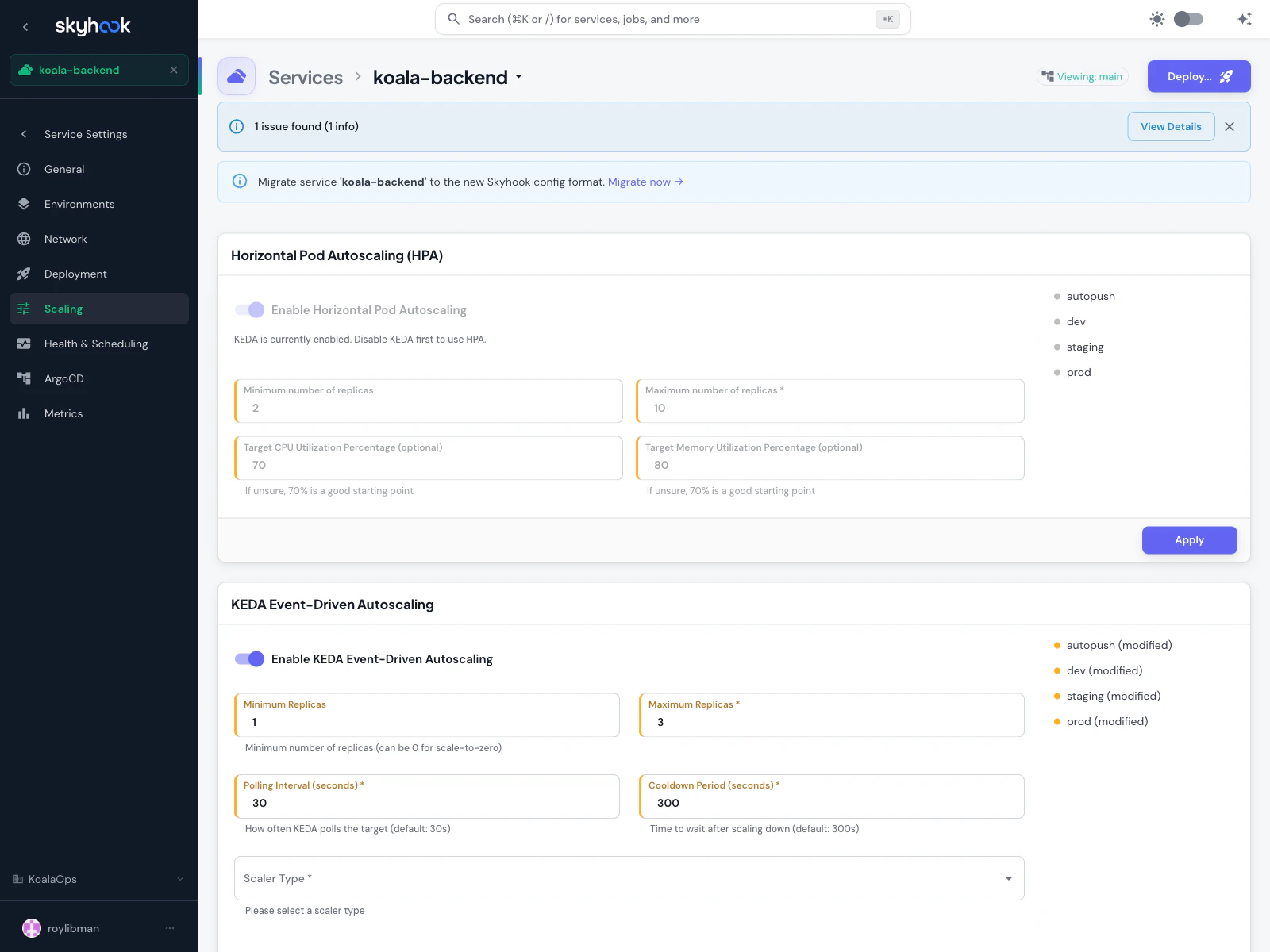 Each section has its own per-environment configuration — you can run HPA in production and leave it off in dev, or enable VPA only on a specific customer environment.
## Horizontal Pod Autoscaling (HPA)
HPA adjusts the number of pod replicas in response to CPU and memory load. Use it when:
* Your workload can safely scale horizontally (stateless or shared-state via cache/db)
* Traffic varies predictably or spikily over time
* You want to trade cost for capacity — more pods when busy, fewer pods when idle
### Fields
| Field | Description |
| ---------------------------------------- | --------------------------------------------------------------------------------------------------------------- |
| **Enable Horizontal Pod Autoscaling** | Toggle on or off for this environment |
| **Minimum number of replicas** | Lower bound — how few pods can be running. Set to keep availability above a floor (typically 2 for production). |
| **Maximum number of replicas** | Upper bound — required, prevents runaway scaling. |
| **Target CPU Utilization Percentage** | Optional. 70% is a good starting point — leaves headroom for spikes while avoiding over-provisioning. |
| **Target Memory Utilization Percentage** | Optional. 70% is also a reasonable default. |
HPA reacts to **sustained** utilization, not spikes. A brief burst over the target won't trigger a scale-up; HPA waits to confirm the load is real. Expect scale-up latency of 30 seconds to a minute, and scale-down of several minutes.
## Vertical Pod Autoscaling (VPA)
VPA watches real CPU and memory usage of your pods and automatically adjusts their `requests` (and optionally `limits`) to match. Use it when:
* You don't know what resource requests to set and want data-driven recommendations
* Your workload has variable per-pod cost but a stable replica count
* You want to fix over-provisioning (paying for reserved capacity you never use) or under-provisioning (OOMKills, CPU throttling)
### Update Modes
VPA has several update modes that control how aggressively it applies its recommendations:
**Recommend only.** VPA watches usage and produces recommendations but doesn't change anything. Good for gathering data before you commit to automated changes.
**Apply once at pod start.** New pods get VPA-recommended requests, but running pods are left alone. Safe for stateful workloads where you don't want restarts.
**Evict and recreate pods** when recommendations drift significantly from actual requests. Causes brief downtime per pod during replacement.
**Update in-place when possible**, fall back to recreate otherwise. Requires a Kubernetes version that supports in-place pod resize.
The older **Auto** mode is deprecated and now aliases to **Recreate**.
### Per-container resource policies
VPA can be scoped per container — useful for multi-container pods where you want to control the main app but leave sidecars alone. For each container you can set:
* **Minimum CPU and memory** — lower bounds VPA won't go below
* **Maximum CPU and memory** — upper bounds VPA won't exceed
* **Controlled resources** — whether VPA manages CPU only, memory only, or both
VPA requires the **Vertical Pod Autoscaler addon** to be installed on the target cluster. Install it from the [Addons catalog](/infrastructure/addons/overview) — search for **VPA**. Skyhook detects the VPA CRD and disables the toggle on clusters where it isn't installed.
### VPA + HPA together
HPA and VPA can both be enabled on the same workload, **but not on the same resource**. The supported pattern is:
* **HPA on CPU** — HPA scales the replica count based on CPU utilization
* **VPA on memory** — VPA adjusts memory requests based on observed usage
Having both target CPU creates a feedback loop where VPA shrinks requests and HPA scales in, then traffic grows and both fight.
## KEDA Event-Driven Autoscaling
KEDA scales on external signals: queue depth, message rate, cron schedules, Prometheus metrics, database row counts — anything KEDA has a scaler for. Use it when HPA's CPU/memory signals don't describe what you actually care about.
KEDA also supports **scale-to-zero** — you can set minimum replicas to 0 and the workload will spin down completely when idle, then spin back up when the first event arrives.
### Fields
| Field | Description |
| ---------------------------------------- | ----------------------------------------------------------------------------------------------------------------------------------------------- |
| **Enable KEDA Event-Driven Autoscaling** | Toggle for this environment |
| **Minimum Replicas** | Lower bound. Set to 0 for scale-to-zero. |
| **Maximum Replicas** | Upper bound |
| **Polling Interval** | How often KEDA checks the scaler (default: 30 seconds) |
| **Cooldown Period** | How long to wait after the last event before scaling down (default: 300 seconds / 5 minutes) |
| **Scaler Type** | Which KEDA scaler to use — Prometheus, RabbitMQ, Kafka, AWS SQS, Google Pub/Sub, Redis, and many more. Each scaler has its own required fields. |
KEDA requires the **KEDA addon** to be installed on the target cluster. Install it from the [Addons catalog](/infrastructure/addons/overview).
## Best practices
### Start with HPA
If you're unsure which to use, start with HPA on CPU or memory — it's the simplest, most battle-tested option, and most workloads scale fine on resource utilization alone.
### Use VPA for right-sizing, not autoscaling
VPA's real value is finding the right resource requests. Run it in **Off** or **Initial** mode for a few weeks, look at the recommendations via the [FinOps Efficiency page](/observability/finops/overview#efficiency-analysis), and apply the right numbers manually or via **Recreate** mode once you're confident.
### KEDA for queue-based workloads
If your service processes messages from a queue, KEDA scaling on queue depth is almost always better than HPA on CPU — CPU usage lags behind queue growth, but queue depth is a leading indicator.
### Test with load
After enabling any autoscaler, generate realistic load (not a simple ramp) and verify that scale-up and scale-down happen when you expect. Tune the target utilization or minimum replicas based on what you see.
## Troubleshooting
HPA needs a metrics source to compute utilization. Install the **Metrics Server** addon on the cluster if it isn't already — it's a one-click install from the Addons catalog. Without it, HPA can't read pod CPU/memory.
The VPA addon isn't installed on that cluster. Install it from the Addons catalog. Skyhook detects the VPA CRD and re-enables the toggle automatically once it's available.
You're probably in **Recreate** mode, which evicts pods when recommendations drift. Switch to **Initial** mode to apply recommendations only to new pods, or tighten the per-container minimum/maximum bounds to reduce churn.
Check three things:
1. The KEDA addon is installed on the target cluster
2. The scaler credentials (e.g. SQS region + access key, RabbitMQ URL) are correct and accessible from within the cluster
3. KEDA's polling interval hasn't elapsed yet — if you just published an event, wait `pollingInterval` seconds for KEDA to notice
Each section has its own per-environment configuration — you can run HPA in production and leave it off in dev, or enable VPA only on a specific customer environment.
## Horizontal Pod Autoscaling (HPA)
HPA adjusts the number of pod replicas in response to CPU and memory load. Use it when:
* Your workload can safely scale horizontally (stateless or shared-state via cache/db)
* Traffic varies predictably or spikily over time
* You want to trade cost for capacity — more pods when busy, fewer pods when idle
### Fields
| Field | Description |
| ---------------------------------------- | --------------------------------------------------------------------------------------------------------------- |
| **Enable Horizontal Pod Autoscaling** | Toggle on or off for this environment |
| **Minimum number of replicas** | Lower bound — how few pods can be running. Set to keep availability above a floor (typically 2 for production). |
| **Maximum number of replicas** | Upper bound — required, prevents runaway scaling. |
| **Target CPU Utilization Percentage** | Optional. 70% is a good starting point — leaves headroom for spikes while avoiding over-provisioning. |
| **Target Memory Utilization Percentage** | Optional. 70% is also a reasonable default. |
HPA reacts to **sustained** utilization, not spikes. A brief burst over the target won't trigger a scale-up; HPA waits to confirm the load is real. Expect scale-up latency of 30 seconds to a minute, and scale-down of several minutes.
## Vertical Pod Autoscaling (VPA)
VPA watches real CPU and memory usage of your pods and automatically adjusts their `requests` (and optionally `limits`) to match. Use it when:
* You don't know what resource requests to set and want data-driven recommendations
* Your workload has variable per-pod cost but a stable replica count
* You want to fix over-provisioning (paying for reserved capacity you never use) or under-provisioning (OOMKills, CPU throttling)
### Update Modes
VPA has several update modes that control how aggressively it applies its recommendations:
**Recommend only.** VPA watches usage and produces recommendations but doesn't change anything. Good for gathering data before you commit to automated changes.
**Apply once at pod start.** New pods get VPA-recommended requests, but running pods are left alone. Safe for stateful workloads where you don't want restarts.
**Evict and recreate pods** when recommendations drift significantly from actual requests. Causes brief downtime per pod during replacement.
**Update in-place when possible**, fall back to recreate otherwise. Requires a Kubernetes version that supports in-place pod resize.
The older **Auto** mode is deprecated and now aliases to **Recreate**.
### Per-container resource policies
VPA can be scoped per container — useful for multi-container pods where you want to control the main app but leave sidecars alone. For each container you can set:
* **Minimum CPU and memory** — lower bounds VPA won't go below
* **Maximum CPU and memory** — upper bounds VPA won't exceed
* **Controlled resources** — whether VPA manages CPU only, memory only, or both
VPA requires the **Vertical Pod Autoscaler addon** to be installed on the target cluster. Install it from the [Addons catalog](/infrastructure/addons/overview) — search for **VPA**. Skyhook detects the VPA CRD and disables the toggle on clusters where it isn't installed.
### VPA + HPA together
HPA and VPA can both be enabled on the same workload, **but not on the same resource**. The supported pattern is:
* **HPA on CPU** — HPA scales the replica count based on CPU utilization
* **VPA on memory** — VPA adjusts memory requests based on observed usage
Having both target CPU creates a feedback loop where VPA shrinks requests and HPA scales in, then traffic grows and both fight.
## KEDA Event-Driven Autoscaling
KEDA scales on external signals: queue depth, message rate, cron schedules, Prometheus metrics, database row counts — anything KEDA has a scaler for. Use it when HPA's CPU/memory signals don't describe what you actually care about.
KEDA also supports **scale-to-zero** — you can set minimum replicas to 0 and the workload will spin down completely when idle, then spin back up when the first event arrives.
### Fields
| Field | Description |
| ---------------------------------------- | ----------------------------------------------------------------------------------------------------------------------------------------------- |
| **Enable KEDA Event-Driven Autoscaling** | Toggle for this environment |
| **Minimum Replicas** | Lower bound. Set to 0 for scale-to-zero. |
| **Maximum Replicas** | Upper bound |
| **Polling Interval** | How often KEDA checks the scaler (default: 30 seconds) |
| **Cooldown Period** | How long to wait after the last event before scaling down (default: 300 seconds / 5 minutes) |
| **Scaler Type** | Which KEDA scaler to use — Prometheus, RabbitMQ, Kafka, AWS SQS, Google Pub/Sub, Redis, and many more. Each scaler has its own required fields. |
KEDA requires the **KEDA addon** to be installed on the target cluster. Install it from the [Addons catalog](/infrastructure/addons/overview).
## Best practices
### Start with HPA
If you're unsure which to use, start with HPA on CPU or memory — it's the simplest, most battle-tested option, and most workloads scale fine on resource utilization alone.
### Use VPA for right-sizing, not autoscaling
VPA's real value is finding the right resource requests. Run it in **Off** or **Initial** mode for a few weeks, look at the recommendations via the [FinOps Efficiency page](/observability/finops/overview#efficiency-analysis), and apply the right numbers manually or via **Recreate** mode once you're confident.
### KEDA for queue-based workloads
If your service processes messages from a queue, KEDA scaling on queue depth is almost always better than HPA on CPU — CPU usage lags behind queue growth, but queue depth is a leading indicator.
### Test with load
After enabling any autoscaler, generate realistic load (not a simple ramp) and verify that scale-up and scale-down happen when you expect. Tune the target utilization or minimum replicas based on what you see.
## Troubleshooting
HPA needs a metrics source to compute utilization. Install the **Metrics Server** addon on the cluster if it isn't already — it's a one-click install from the Addons catalog. Without it, HPA can't read pod CPU/memory.
The VPA addon isn't installed on that cluster. Install it from the Addons catalog. Skyhook detects the VPA CRD and re-enables the toggle automatically once it's available.
You're probably in **Recreate** mode, which evicts pods when recommendations drift. Switch to **Initial** mode to apply recommendations only to new pods, or tighten the per-container minimum/maximum bounds to reduce churn.
Check three things:
1. The KEDA addon is installed on the target cluster
2. The scaler credentials (e.g. SQS region + access key, RabbitMQ URL) are correct and accessible from within the cluster
3. KEDA's polling interval hasn't elapsed yet — if you just published an event, wait `pollingInterval` seconds for KEDA to notice