> ## Documentation Index
> Fetch the complete documentation index at: https://docs.skyhook.io/llms.txt
> Use this file to discover all available pages before exploring further.
# Karpenter
> Automatic node provisioning and cost-aware scheduling for AWS clusters, with per-cluster node strategy management from Skyhook.
[Karpenter](https://karpenter.sh/) is a Kubernetes node autoscaler that provisions the right-sized compute for your pods in seconds — instead of pre-provisioning a fixed node pool and hoping it fits your workloads. Skyhook ships Karpenter as a one-click addon for AWS clusters and adds a dedicated **Node Strategy** page where you can set the scheduling strategy per cluster.
Karpenter currently supports **AWS clusters only**. Skyhook filters Karpenter out of the addon catalog for non-AWS clusters automatically.
## Installing Karpenter
Karpenter is in the main addon catalog. From **Addons**, search for Karpenter and click **Install** on any AWS cluster.
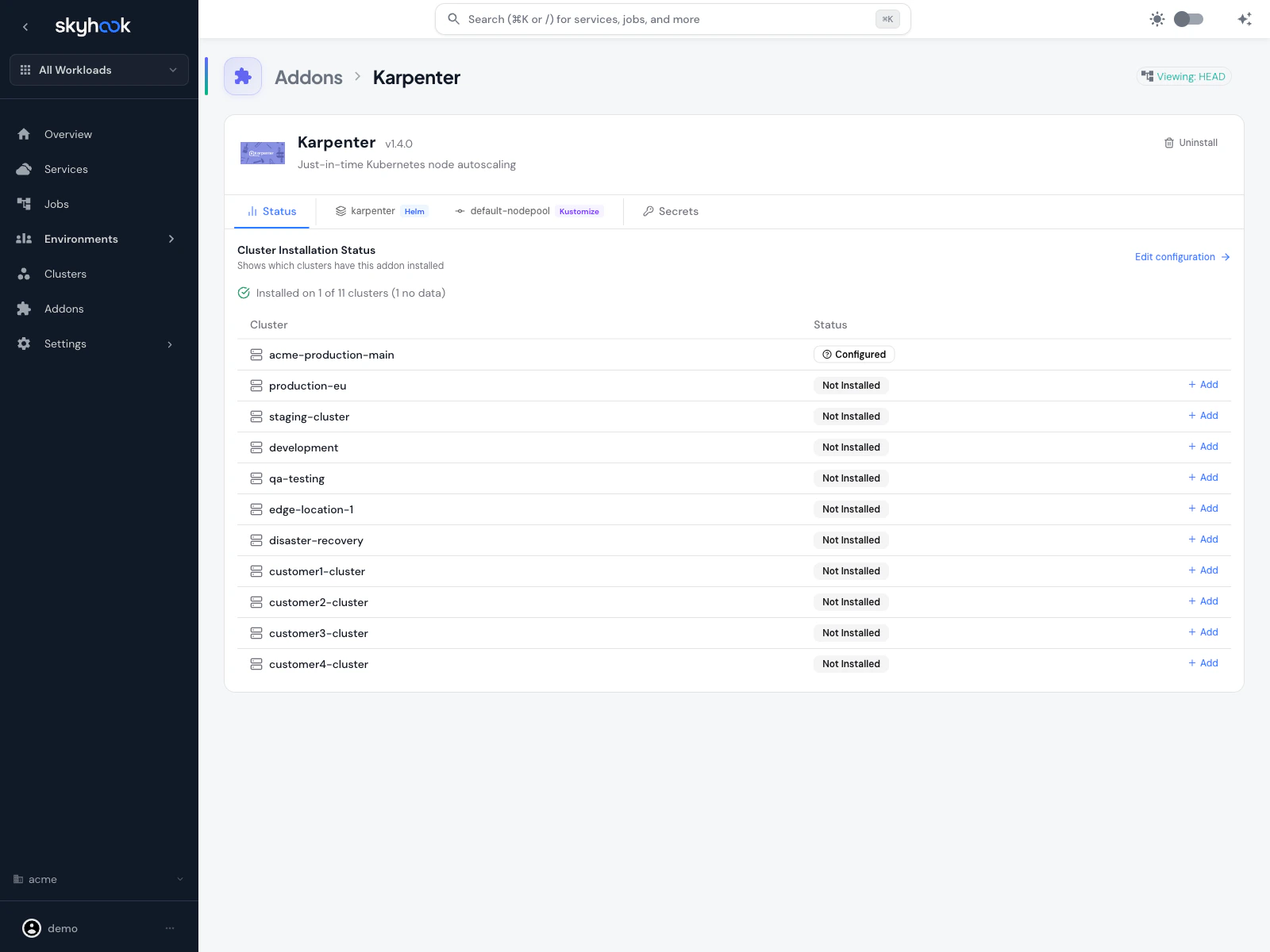 The addon installs two pieces:
* **Karpenter controller** — the Kubernetes operator that watches pending pods and provisions nodes
* **Default NodePool** — a starter NodePool with sensible defaults for consolidation, expiration, and disruption handling
After merging the generated pull request, wait for ArgoCD to sync and for the Karpenter controller pods to come up. Once running, Karpenter starts reacting to new unschedulable pods on its own.
### Default NodePool behavior
The default NodePool ships with conservative defaults:
* **Consolidation** — Karpenter actively consolidates underutilized nodes (moving pods to fewer, larger or smaller nodes as appropriate)
* **`consolidateAfter: 30s`** — nodes are considered for consolidation 30 seconds after becoming empty or underutilized
* **`expireAfter`** — nodes expire on a schedule so fresh AMIs and patches roll through
* **Cloud-provider-appropriate instance types** — the NodePool starts with a broad instance family selection that Karpenter narrows down based on actual pod requirements
You can edit the NodePool YAML directly on the addon's Configure tab if you want to customize instance types, zones, Spot limits, or disruption behavior.
## Node Strategy page
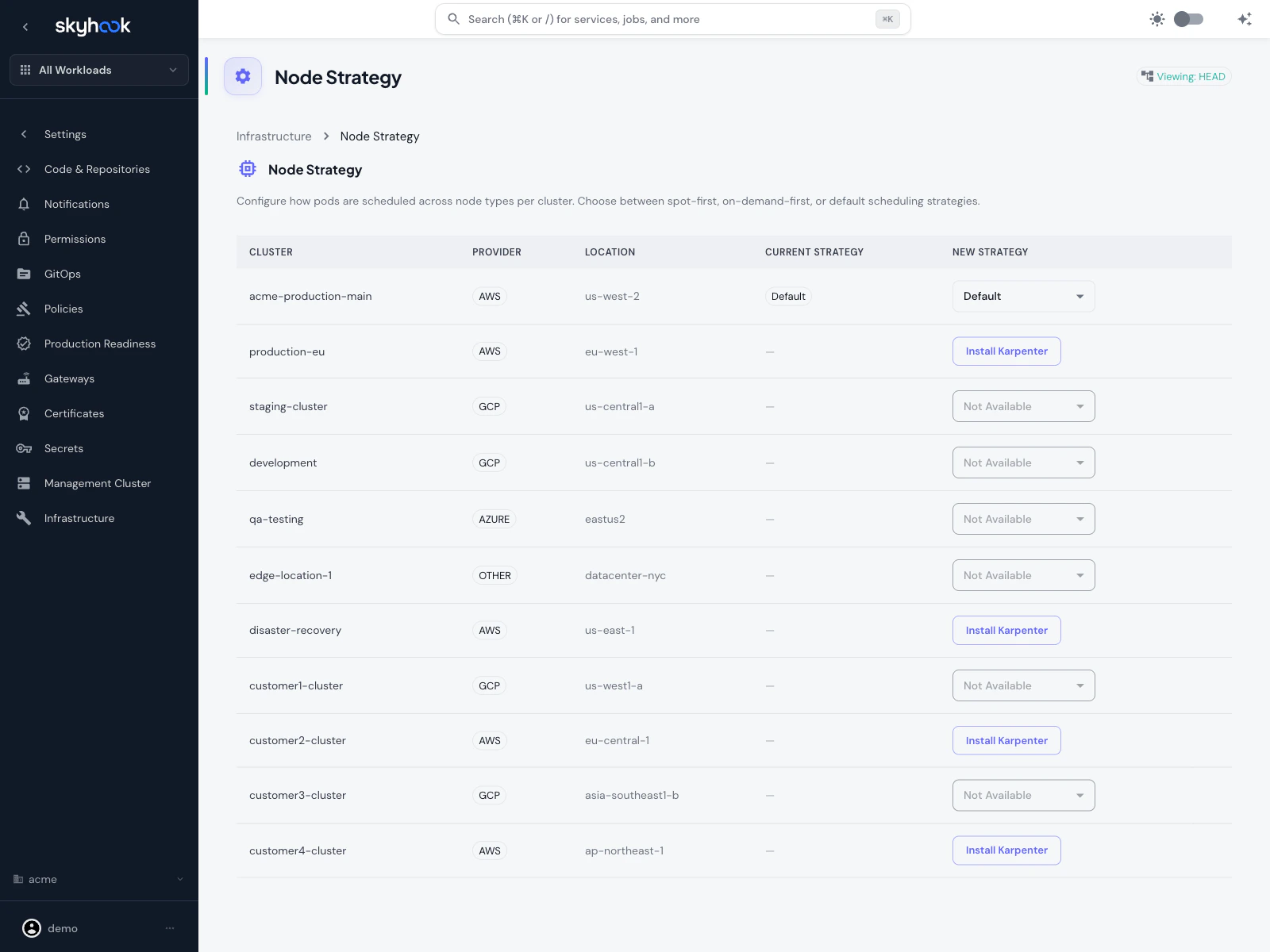
For multi-cluster Karpenter management, Skyhook adds a dedicated **Node Strategy** page at **Settings → Infrastructure → Node Strategy**.
The addon installs two pieces:
* **Karpenter controller** — the Kubernetes operator that watches pending pods and provisions nodes
* **Default NodePool** — a starter NodePool with sensible defaults for consolidation, expiration, and disruption handling
After merging the generated pull request, wait for ArgoCD to sync and for the Karpenter controller pods to come up. Once running, Karpenter starts reacting to new unschedulable pods on its own.
### Default NodePool behavior
The default NodePool ships with conservative defaults:
* **Consolidation** — Karpenter actively consolidates underutilized nodes (moving pods to fewer, larger or smaller nodes as appropriate)
* **`consolidateAfter: 30s`** — nodes are considered for consolidation 30 seconds after becoming empty or underutilized
* **`expireAfter`** — nodes expire on a schedule so fresh AMIs and patches roll through
* **Cloud-provider-appropriate instance types** — the NodePool starts with a broad instance family selection that Karpenter narrows down based on actual pod requirements
You can edit the NodePool YAML directly on the addon's Configure tab if you want to customize instance types, zones, Spot limits, or disruption behavior.
## Node Strategy page
For multi-cluster Karpenter management, Skyhook adds a dedicated **Node Strategy** page at **Settings → Infrastructure → Node Strategy**.
 ### What the page shows
One row per cluster in your organization:
* **Cluster** — cluster name
* **Provider** — cloud provider (AWS / GCP / Azure / Other)
* **Location** — region or zone
* **Current Strategy** — the strategy Karpenter is currently using on that cluster
* **New Strategy** — a dropdown to change the strategy, or **Install Karpenter** if it isn't installed yet, or **Not Available** if the cluster isn't on AWS
### Available strategies
Karpenter provisions **Spot** instances first, falling back to On-Demand only when Spot capacity isn't available or when pods explicitly require On-Demand. Cheapest but may disrupt workloads more often.
Karpenter provisions **On-Demand** instances first. Higher cost but more predictable — good for production workloads that can't tolerate Spot interruptions.
Use Karpenter's built-in scheduling behavior without a Skyhook-provided strategy override. The NodePool's own settings determine placement.
Changing a strategy opens a pull request that updates the NodePool manifest with the new scheduling rules. ArgoCD applies the change after merge, and Karpenter reconciles existing nodes against the new strategy over its next consolidation pass.
### Non-AWS clusters
Non-AWS clusters appear on the page greyed out with **Not Available** because Karpenter only supports AWS. You'll see them listed so you have a full fleet view, but you can't install Karpenter on them.
## Using Karpenter with services
Services you deploy to Karpenter-enabled clusters can influence node placement via **nodeSelector** and **tolerations** in their deployment settings.
Skyhook surfaces a **Node Scheduling** card on the service's deployment settings tab that:
* Lists all clusters the service is deployed to
* Shows which ones have Karpenter installed
* Offers **Karpenter quick actions** per cluster (for example, "Prefer Spot nodes", "Dedicate to this workload")
* Autocompletes label keys from the actual nodes in the cluster, so you're not guessing label names
### Example: Spot workload
To make a service prefer Spot nodes but still run on On-Demand if no Spot capacity is available:
```yaml theme={"system"}
tolerations:
- key: "karpenter.sh/capacity-type"
operator: "Equal"
value: "spot"
effect: "NoSchedule"
nodeSelector:
karpenter.sh/capacity-type: spot
```
The Node Scheduling card on the service settings page generates these entries for you.
## Troubleshooting
Karpenter only shows up for AWS clusters. If you're looking at a GCP, Azure, or Other/On-Prem cluster, Karpenter is filtered out because it doesn't apply.
Clicking the button should open a pull request to install the Karpenter addon on that cluster. If nothing happens, check the browser console for errors and verify your GitOps repository is properly configured in **Settings → Code & Repositories**.
Check three things:
1. **Karpenter controller is running** — check the cluster resource viewer for the `karpenter` namespace. If pods aren't healthy, review ArgoCD sync status for the addon.
2. **NodePool covers the required instance types** — if your pod requests a specific architecture (arm64) or a large resource footprint, make sure the NodePool's instance family selection includes nodes that can satisfy it.
3. **EC2 quota** — Karpenter can only provision nodes your AWS account has quota for. Check AWS Service Quotas for vCPU limits on the instance types Karpenter is trying to launch.
Either switch that specific service to On-Demand via its Node Scheduling settings, or switch the entire cluster's strategy to **On-Demand-First** on the Node Strategy page. You can also configure Karpenter to pre-drain Spot nodes on interruption warnings so pods move gracefully — see the [Karpenter disruption docs](https://karpenter.sh/docs/concepts/disruption/).
### What the page shows
One row per cluster in your organization:
* **Cluster** — cluster name
* **Provider** — cloud provider (AWS / GCP / Azure / Other)
* **Location** — region or zone
* **Current Strategy** — the strategy Karpenter is currently using on that cluster
* **New Strategy** — a dropdown to change the strategy, or **Install Karpenter** if it isn't installed yet, or **Not Available** if the cluster isn't on AWS
### Available strategies
Karpenter provisions **Spot** instances first, falling back to On-Demand only when Spot capacity isn't available or when pods explicitly require On-Demand. Cheapest but may disrupt workloads more often.
Karpenter provisions **On-Demand** instances first. Higher cost but more predictable — good for production workloads that can't tolerate Spot interruptions.
Use Karpenter's built-in scheduling behavior without a Skyhook-provided strategy override. The NodePool's own settings determine placement.
Changing a strategy opens a pull request that updates the NodePool manifest with the new scheduling rules. ArgoCD applies the change after merge, and Karpenter reconciles existing nodes against the new strategy over its next consolidation pass.
### Non-AWS clusters
Non-AWS clusters appear on the page greyed out with **Not Available** because Karpenter only supports AWS. You'll see them listed so you have a full fleet view, but you can't install Karpenter on them.
## Using Karpenter with services
Services you deploy to Karpenter-enabled clusters can influence node placement via **nodeSelector** and **tolerations** in their deployment settings.
Skyhook surfaces a **Node Scheduling** card on the service's deployment settings tab that:
* Lists all clusters the service is deployed to
* Shows which ones have Karpenter installed
* Offers **Karpenter quick actions** per cluster (for example, "Prefer Spot nodes", "Dedicate to this workload")
* Autocompletes label keys from the actual nodes in the cluster, so you're not guessing label names
### Example: Spot workload
To make a service prefer Spot nodes but still run on On-Demand if no Spot capacity is available:
```yaml theme={"system"}
tolerations:
- key: "karpenter.sh/capacity-type"
operator: "Equal"
value: "spot"
effect: "NoSchedule"
nodeSelector:
karpenter.sh/capacity-type: spot
```
The Node Scheduling card on the service settings page generates these entries for you.
## Troubleshooting
Karpenter only shows up for AWS clusters. If you're looking at a GCP, Azure, or Other/On-Prem cluster, Karpenter is filtered out because it doesn't apply.
Clicking the button should open a pull request to install the Karpenter addon on that cluster. If nothing happens, check the browser console for errors and verify your GitOps repository is properly configured in **Settings → Code & Repositories**.
Check three things:
1. **Karpenter controller is running** — check the cluster resource viewer for the `karpenter` namespace. If pods aren't healthy, review ArgoCD sync status for the addon.
2. **NodePool covers the required instance types** — if your pod requests a specific architecture (arm64) or a large resource footprint, make sure the NodePool's instance family selection includes nodes that can satisfy it.
3. **EC2 quota** — Karpenter can only provision nodes your AWS account has quota for. Check AWS Service Quotas for vCPU limits on the instance types Karpenter is trying to launch.
Either switch that specific service to On-Demand via its Node Scheduling settings, or switch the entire cluster's strategy to **On-Demand-First** on the Node Strategy page. You can also configure Karpenter to pre-drain Spot nodes on interruption warnings so pods move gracefully — see the [Karpenter disruption docs](https://karpenter.sh/docs/concepts/disruption/).