> ## Documentation Index
> Fetch the complete documentation index at: https://docs.skyhook.io/llms.txt
> Use this file to discover all available pages before exploring further.
# Code & Repositories
> Configure repository settings, code preferences, and service templates for new services
Configure default code and repository settings that apply to new services. Existing services maintain their current configuration.
Access this page from **Settings > Code & Repositories** in the sidebar.
## Repository Settings
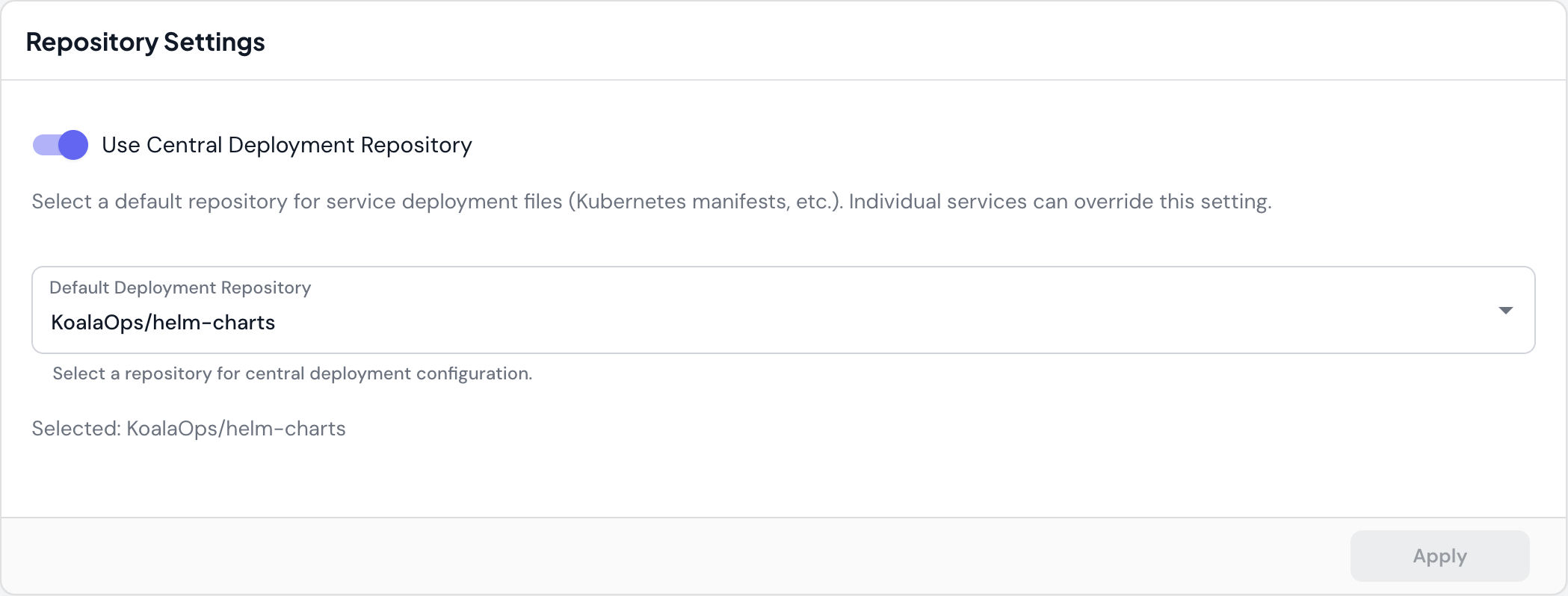 ### Use Central Deployment Repository
Select a default repository for service deployment files (Kubernetes manifests, Helm charts, etc.). Individual services can override this setting.
* **When to use**: Centralize deployment configuration across multiple services in a single repository
* **Override**: Services can specify their own deployment repository if needed
* **Example**: `KoalaOps/helm-charts` stores all service Helm charts in one place
This is particularly useful for monorepo setups or when following GitOps practices with a dedicated infrastructure repository.
## Code Preferences
### Use Central Deployment Repository
Select a default repository for service deployment files (Kubernetes manifests, Helm charts, etc.). Individual services can override this setting.
* **When to use**: Centralize deployment configuration across multiple services in a single repository
* **Override**: Services can specify their own deployment repository if needed
* **Example**: `KoalaOps/helm-charts` stores all service Helm charts in one place
This is particularly useful for monorepo setups or when following GitOps practices with a dedicated infrastructure repository.
## Code Preferences
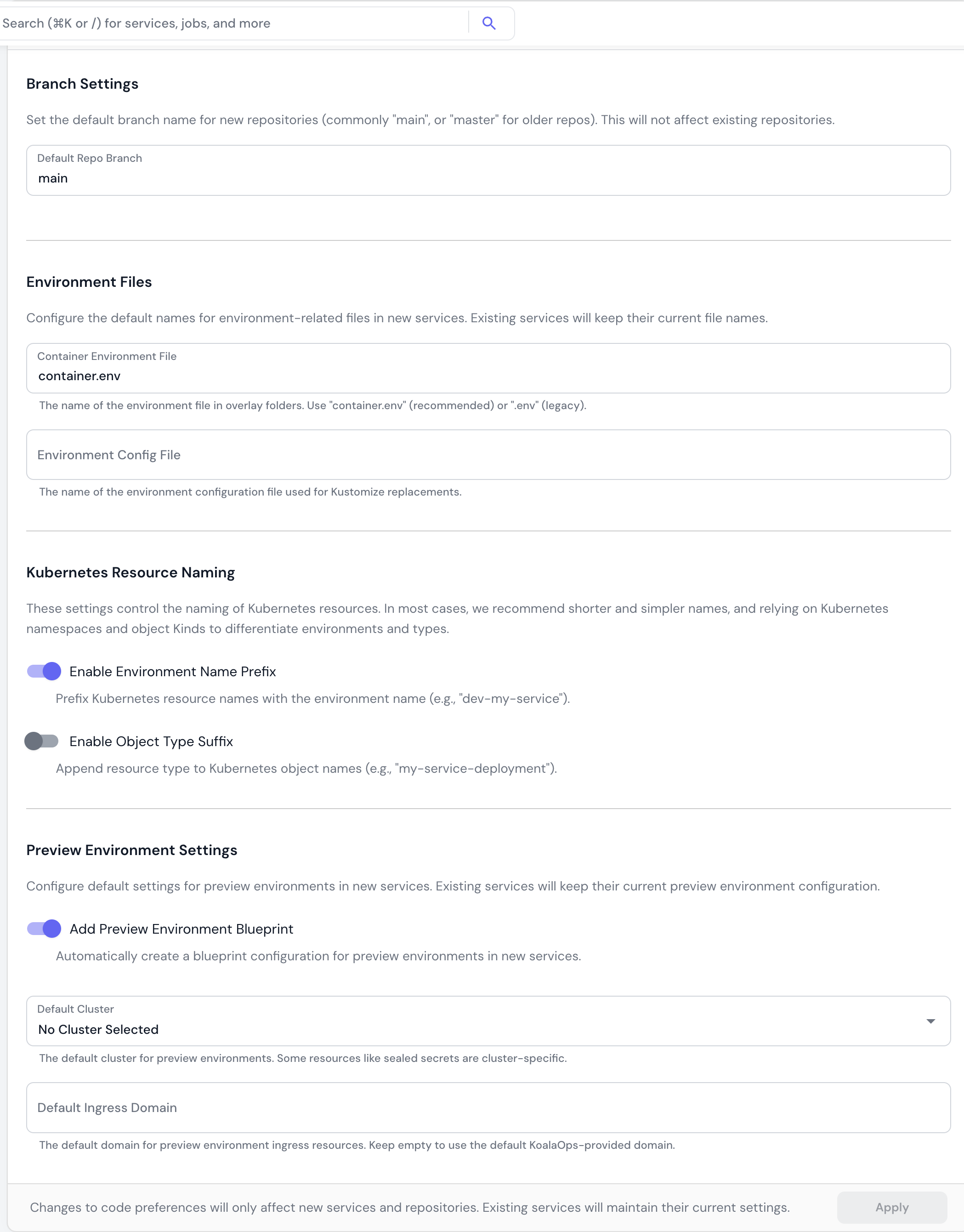 Settings that control code generation and naming conventions for new services.
### Branch Settings
**Default Repo Branch**
The default branch name for new repositories (`main`, `master`, etc.). This does not affect existing repositories.
* **Default**: `main`
* **When to use**: Set to `master` if your organization uses legacy naming conventions
### Environment Files
Configure the default names for environment-related files in new services.
**Container Environment File**
The name of the environment file in overlay folders.
* **Recommended**: `container.env` (modern standard)
* **Legacy**: `.env` (for backward compatibility)
* **Purpose**: Stores environment variables for containers in Kustomize overlays
**Environment Config File**
The name of the environment configuration file used for Kustomize replacements.
* **Purpose**: Defines environment-specific values for Kustomize variable substitution
Changing these settings only affects new services. Existing services keep their current file names to avoid breaking existing deployments.
### Kubernetes Resource Naming
Control how Kubernetes resources are named across your organization.
**Enable Environment Name Prefix**
Prefix Kubernetes resource names with the environment name.
* **Example**: `dev-my-service`, `prod-my-service`
* **Trade-off**: Longer names but explicit environment identification
* **Recommendation**: Use Kubernetes namespaces instead of prefixes for environment separation
**Enable Object Type Suffix**
Append resource type to Kubernetes object names.
* **Example**: `my-service-deployment`, `my-service-service`
* **Trade-off**: More explicit but more verbose
* **Recommendation**: Rely on Kubernetes object Kinds rather than adding suffixes
In most cases, we recommend shorter and simpler names, relying on Kubernetes namespaces and object Kinds to differentiate environments and types.
### Preview Environment Settings
Configure default settings for preview environments in new services.
**Add Preview Environment Blueprint**
Automatically create a blueprint configuration for preview environments when creating new services.
* **When enabled**: New services include preview environment setup out of the box
* **When to use**: If your team regularly uses preview environments for PR testing
**Default Cluster**
The default cluster for preview environments.
* **Purpose**: Some resources like sealed secrets are cluster-specific
* **Recommendation**: Select a non-production cluster for preview workloads
**Default Ingress Domain**
The default domain for preview environment ingress resources.
* **Leave empty**: Use the default Skyhook-provided domain
* **Custom domain**: Specify your own domain for preview environments (e.g., `preview.example.com`)
## Service Templates
Settings that control code generation and naming conventions for new services.
### Branch Settings
**Default Repo Branch**
The default branch name for new repositories (`main`, `master`, etc.). This does not affect existing repositories.
* **Default**: `main`
* **When to use**: Set to `master` if your organization uses legacy naming conventions
### Environment Files
Configure the default names for environment-related files in new services.
**Container Environment File**
The name of the environment file in overlay folders.
* **Recommended**: `container.env` (modern standard)
* **Legacy**: `.env` (for backward compatibility)
* **Purpose**: Stores environment variables for containers in Kustomize overlays
**Environment Config File**
The name of the environment configuration file used for Kustomize replacements.
* **Purpose**: Defines environment-specific values for Kustomize variable substitution
Changing these settings only affects new services. Existing services keep their current file names to avoid breaking existing deployments.
### Kubernetes Resource Naming
Control how Kubernetes resources are named across your organization.
**Enable Environment Name Prefix**
Prefix Kubernetes resource names with the environment name.
* **Example**: `dev-my-service`, `prod-my-service`
* **Trade-off**: Longer names but explicit environment identification
* **Recommendation**: Use Kubernetes namespaces instead of prefixes for environment separation
**Enable Object Type Suffix**
Append resource type to Kubernetes object names.
* **Example**: `my-service-deployment`, `my-service-service`
* **Trade-off**: More explicit but more verbose
* **Recommendation**: Rely on Kubernetes object Kinds rather than adding suffixes
In most cases, we recommend shorter and simpler names, relying on Kubernetes namespaces and object Kinds to differentiate environments and types.
### Preview Environment Settings
Configure default settings for preview environments in new services.
**Add Preview Environment Blueprint**
Automatically create a blueprint configuration for preview environments when creating new services.
* **When enabled**: New services include preview environment setup out of the box
* **When to use**: If your team regularly uses preview environments for PR testing
**Default Cluster**
The default cluster for preview environments.
* **Purpose**: Some resources like sealed secrets are cluster-specific
* **Recommendation**: Select a non-production cluster for preview workloads
**Default Ingress Domain**
The default domain for preview environment ingress resources.
* **Leave empty**: Use the default Skyhook-provided domain
* **Custom domain**: Specify your own domain for preview environments (e.g., `preview.example.com`)
## Service Templates
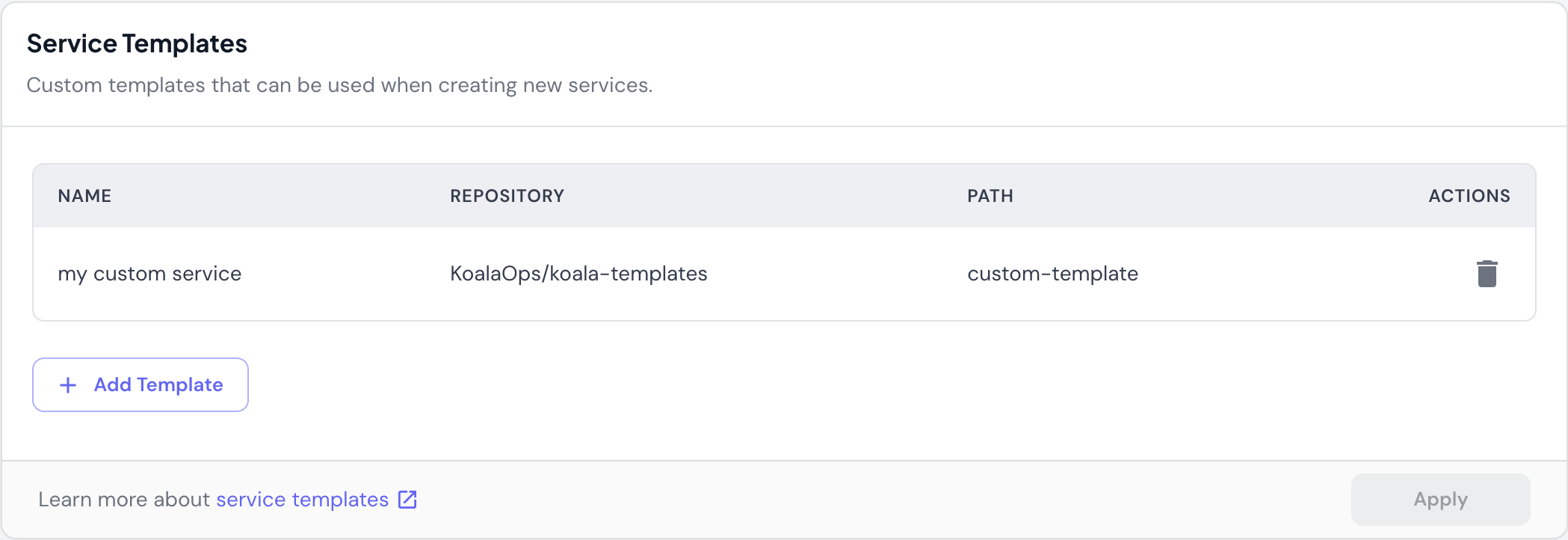 Custom templates that can be used when creating new services.
* **Repository**: Where the template code is stored
* **Path**: Directory path within the repository
* **Usage**: Select template when creating a new service
**Managing templates**:
* **Add Template**: Point to a repository and path containing your service template
* **Delete**: Remove templates that are no longer needed
## Important Notes
**Code preferences only affect new services**. Changing settings like branch names, environment files, or resource naming will not update existing services. Existing services maintain their current configuration to avoid breaking changes.
**Apply button**: Most sections have an "Apply" button that remains disabled until you make changes. Click "Apply" to save your configuration updates.
Custom templates that can be used when creating new services.
* **Repository**: Where the template code is stored
* **Path**: Directory path within the repository
* **Usage**: Select template when creating a new service
**Managing templates**:
* **Add Template**: Point to a repository and path containing your service template
* **Delete**: Remove templates that are no longer needed
## Important Notes
**Code preferences only affect new services**. Changing settings like branch names, environment files, or resource naming will not update existing services. Existing services maintain their current configuration to avoid breaking changes.
**Apply button**: Most sections have an "Apply" button that remains disabled until you make changes. Click "Apply" to save your configuration updates.