> ## Documentation Index
> Fetch the complete documentation index at: https://docs.skyhook.io/llms.txt
> Use this file to discover all available pages before exploring further.
# Deployment Permissions
> Control who can deploy to specific services and environments
Configure who can deploy to specific services and environments using allow or block rules.
Access this page from **Settings > Permissions** in the sidebar.
## Deployment Permissions
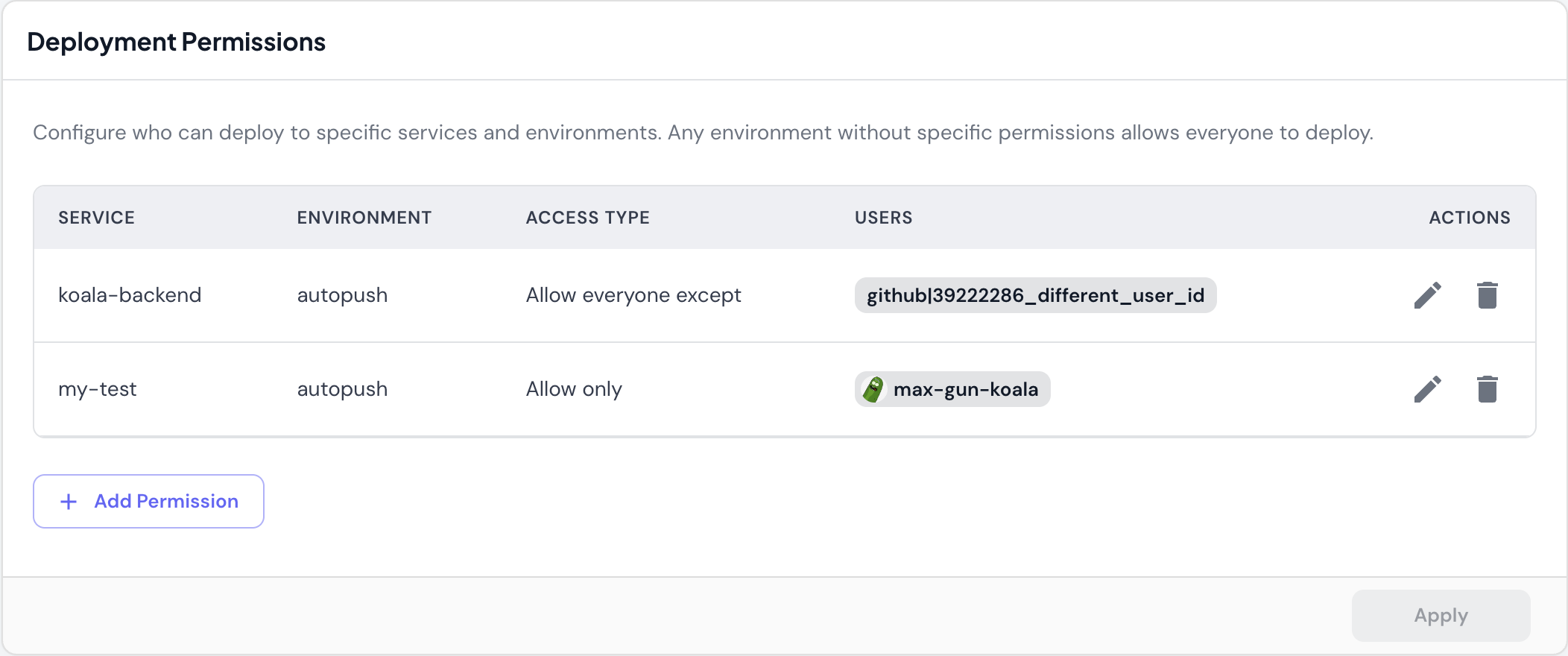 Control access to deployments using environment and service-specific rules.
### Default Behavior
**Any environment without specific permissions allows everyone to deploy.**
This means you only need to configure permissions where you want to restrict access. All other services and environments remain open to all team members.
### Access Types
**Allow only**
Grant deployment access to specific users only.
* **Example**: `my-service` in `prod` can only be deployed by `max-gun-koala`
* **Use case**: Restrict production deployments to approved team members
* **Effect**: Only listed users can deploy; all others are blocked
**Allow everyone except**
Grant deployment access to all users except specific ones.
* **Example**: `koala-backend` in `autopush` can be deployed by anyone except `github|39222286_different_user_id`
* **Use case**: Block specific users while allowing the rest of the team
* **Effect**: All users can deploy except those listed
### Permission Components
Each permission rule includes:
* **Service**: Which service the rule applies to (e.g., `koala-backend`, `my-test`)
* **Environment**: Which environment the rule applies to (e.g., `dev`, `staging`, `prod`, `autopush`)
* **Access Type**: Either "Allow only" or "Allow everyone except"
* **Users**: GitHub usernames or user IDs
* With avatar: `max-gun-koala` (GitHub username)
* Without avatar: `github|39222286_different_user_id` (user ID)
### Managing Permissions
* **Add Permission**: Create a new deployment permission rule
* **Edit**: Modify an existing rule's access type or users
* **Delete**: Remove a rule (environment reverts to "allow everyone")
## Common Scenarios
### Restrict Production Deployments
Limit who can deploy to production:
1. Click **Add Permission**
2. Select service: `my-service`
3. Select environment: `prod`
4. Choose access type: **Allow only**
5. Add approved users: `senior-dev-1`, `senior-dev-2`
Result: Only `senior-dev-1` and `senior-dev-2` can deploy to `my-service` in `prod`.
### Block Specific Users
Prevent a user from deploying to a sensitive environment:
1. Click **Add Permission**
2. Select service: `payment-service`
3. Select environment: `prod`
4. Choose access type: **Allow everyone except**
5. Add blocked user: `intern-username`
Result: All users except `intern-username` can deploy `payment-service` to `prod`.
### Temporary Access Restriction
Block deployments during a freeze or incident:
1. Click **Add Permission**
2. Select service: `all-services` (or specific service)
3. Select environment: `prod`
4. Choose access type: **Allow only**
5. Add users: `on-call-engineer`
Result: Only the on-call engineer can deploy during the freeze.
## Important Notes
**Permissions are environment-specific**. A user blocked from deploying to `prod` can still deploy to `dev` unless explicitly restricted.
**Service-level restrictions**. Permissions apply per service. If you want organization-wide restrictions, you must create rules for each service.
**GitHub integration required**. Users are identified by their GitHub username or GitHub user ID. Ensure your team members have connected their GitHub accounts to Skyhook.
## Best Practices
### Start Permissive
Don't over-restrict initially:
* Leave most environments open (default behavior)
* Only restrict production or sensitive environments
* Add restrictions as needed based on team growth
### Use Allow-Only for Critical Environments
For production or other critical environments:
* Use "Allow only" with a list of trusted deployers
* Keeps control explicit and visible
* Easy to audit who has production access
### Use Except for Temporary Blocks
When you need to temporarily restrict someone:
* Use "Allow everyone except" to block specific users
* Easier to remove the exception later
* Doesn't require maintaining a full allow list
### Document Your Permissions
Keep track of why permissions exist:
* Add comments in your team's documentation
* Explain the reasoning for production restrictions
* Note temporary restrictions and when to remove them
## Related Documentation
* [Team Management](/infrastructure/security/team-management) - Overall RBAC and team access
* [Environments](/application/environments/overview) - Understanding environments
* [Service Deployment](/application/services/deploy) - How deployments work
* [CI/CD](/application/cicd/overview) - CI/CD pipeline permissions
Control access to deployments using environment and service-specific rules.
### Default Behavior
**Any environment without specific permissions allows everyone to deploy.**
This means you only need to configure permissions where you want to restrict access. All other services and environments remain open to all team members.
### Access Types
**Allow only**
Grant deployment access to specific users only.
* **Example**: `my-service` in `prod` can only be deployed by `max-gun-koala`
* **Use case**: Restrict production deployments to approved team members
* **Effect**: Only listed users can deploy; all others are blocked
**Allow everyone except**
Grant deployment access to all users except specific ones.
* **Example**: `koala-backend` in `autopush` can be deployed by anyone except `github|39222286_different_user_id`
* **Use case**: Block specific users while allowing the rest of the team
* **Effect**: All users can deploy except those listed
### Permission Components
Each permission rule includes:
* **Service**: Which service the rule applies to (e.g., `koala-backend`, `my-test`)
* **Environment**: Which environment the rule applies to (e.g., `dev`, `staging`, `prod`, `autopush`)
* **Access Type**: Either "Allow only" or "Allow everyone except"
* **Users**: GitHub usernames or user IDs
* With avatar: `max-gun-koala` (GitHub username)
* Without avatar: `github|39222286_different_user_id` (user ID)
### Managing Permissions
* **Add Permission**: Create a new deployment permission rule
* **Edit**: Modify an existing rule's access type or users
* **Delete**: Remove a rule (environment reverts to "allow everyone")
## Common Scenarios
### Restrict Production Deployments
Limit who can deploy to production:
1. Click **Add Permission**
2. Select service: `my-service`
3. Select environment: `prod`
4. Choose access type: **Allow only**
5. Add approved users: `senior-dev-1`, `senior-dev-2`
Result: Only `senior-dev-1` and `senior-dev-2` can deploy to `my-service` in `prod`.
### Block Specific Users
Prevent a user from deploying to a sensitive environment:
1. Click **Add Permission**
2. Select service: `payment-service`
3. Select environment: `prod`
4. Choose access type: **Allow everyone except**
5. Add blocked user: `intern-username`
Result: All users except `intern-username` can deploy `payment-service` to `prod`.
### Temporary Access Restriction
Block deployments during a freeze or incident:
1. Click **Add Permission**
2. Select service: `all-services` (or specific service)
3. Select environment: `prod`
4. Choose access type: **Allow only**
5. Add users: `on-call-engineer`
Result: Only the on-call engineer can deploy during the freeze.
## Important Notes
**Permissions are environment-specific**. A user blocked from deploying to `prod` can still deploy to `dev` unless explicitly restricted.
**Service-level restrictions**. Permissions apply per service. If you want organization-wide restrictions, you must create rules for each service.
**GitHub integration required**. Users are identified by their GitHub username or GitHub user ID. Ensure your team members have connected their GitHub accounts to Skyhook.
## Best Practices
### Start Permissive
Don't over-restrict initially:
* Leave most environments open (default behavior)
* Only restrict production or sensitive environments
* Add restrictions as needed based on team growth
### Use Allow-Only for Critical Environments
For production or other critical environments:
* Use "Allow only" with a list of trusted deployers
* Keeps control explicit and visible
* Easy to audit who has production access
### Use Except for Temporary Blocks
When you need to temporarily restrict someone:
* Use "Allow everyone except" to block specific users
* Easier to remove the exception later
* Doesn't require maintaining a full allow list
### Document Your Permissions
Keep track of why permissions exist:
* Add comments in your team's documentation
* Explain the reasoning for production restrictions
* Note temporary restrictions and when to remove them
## Related Documentation
* [Team Management](/infrastructure/security/team-management) - Overall RBAC and team access
* [Environments](/application/environments/overview) - Understanding environments
* [Service Deployment](/application/services/deploy) - How deployments work
* [CI/CD](/application/cicd/overview) - CI/CD pipeline permissions