
What “monorepo” means in Skyhook:In Skyhook’s context, “monorepo” simply means multiple services/jobs in one Git repository. When you have multiple services in one repo, Skyhook generates slightly different CI/CD workflows (using GitHub Actions matrix strategy) to build and deploy services independently.This has nothing to do with monorepo tools like Nx or Turborepo - those are optional advanced features you can add later. See Advanced Monorepo Tools for details.
Deployment files: Monorepos work with multiple deployment patterns:
- In each service directory: Deploy files alongside code (e.g.,
services/api-gateway/deploy/) - Dedicated directory in monorepo: All deploy files in one place (e.g.,
deploy/api-gateway/,deploy/user-service/) - Separate deployment repository: All services use a centralized deployment repository outside the code monorepo
What Skyhook Provides for Monorepos
Skyhook provides full automated support for organizing multiple services/jobs in a single repository:- ✅ Path-based service identification - Each service lives in its own directory path
- ✅ Matrix-based CI/CD workflows - Builds all services in parallel when code changes (default behavior)
- ✅ Independent image tags - Each service gets its own Docker image tag and version
- ✅ Independent deployments - Deploy/promote services individually via Skyhook UI
- ✅ Shared code - All services can access common directories and packages
- ✅ Automatic service registry - Maintains
.skyhook/skyhook.yamllisting all services and their environments
Configuration in .koala.toml
The.koala.toml file contains the Repo section that specifies where code and deployment files live:
Example 1: Monorepo with deploy files alongside each service
Skyhook manages these fields automatically based on your choices during
service/job creation. You typically don’t need to edit them manually.
Setting Up Your First Monorepo Service
Step 1: Create Repository Structure
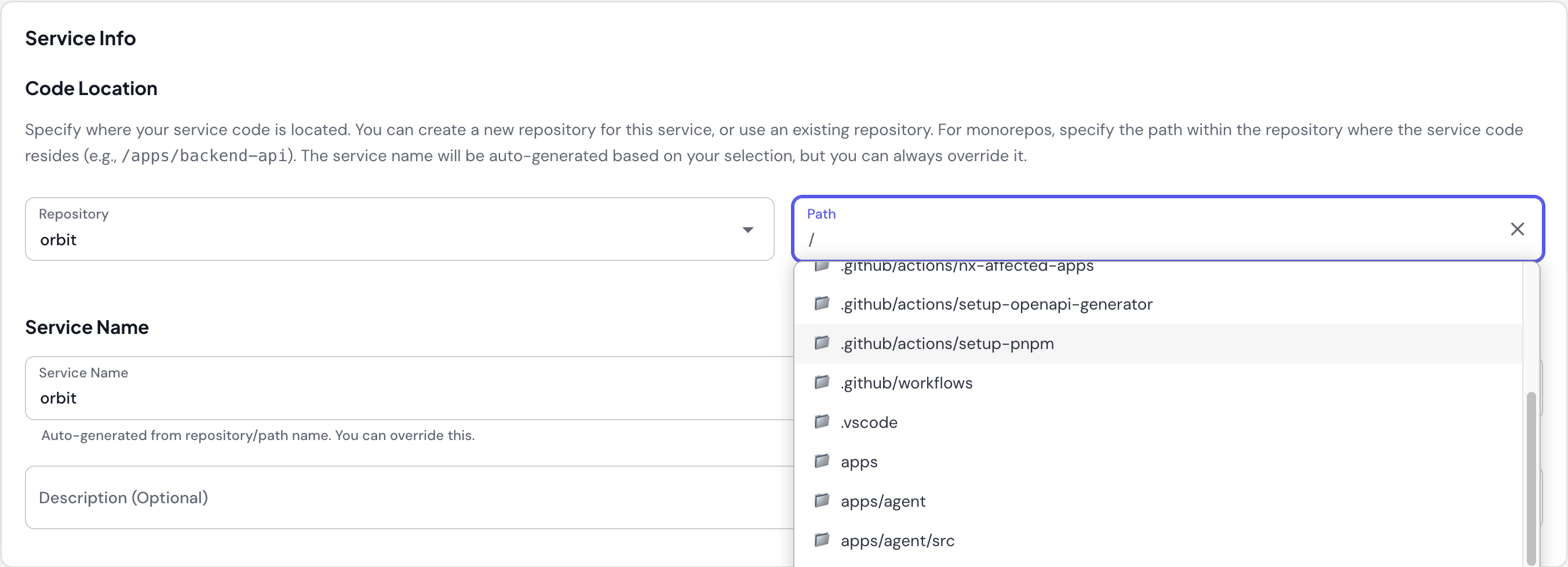
Step 2: Create First Service in Skyhook
- Navigate to Services → Create New Service
- Select “Monorepo” for Service Repo Type
- Choose repository:
my-monorepo(or create new) - Specify path in repo:
services/api-gateway - Service name auto-suggested:
api-gateway(from path)
Step 3: Skyhook Generates Files
Skyhook creates service-specific files at your specified path:Step 4: Add More Services
Repeat the process for additional services:- Create New Service
- Select “Monorepo” for Service Repo Type
- Choose same repository:
my-monorepo - Specify different path:
services/user-service - Service name auto-suggested:
user-service
.skyhook/skyhook.yaml and gets its own deployment config.
Example: Language-Specific Monorepo (Go)
CI/CD Behavior
Service discovery and matrix builds
When you push to a release branch (likemain), the generated release.yml uses skyhook-io/generate-service-matrix@v1 to produce a build/deploy matrix. The action reads your repository’s Skyhook config, enumerates services × environments, and emits a strategy.matrix JSON object the rest of the workflow fans out on.
How it works:
- Service discovery — the matrix action reads
.skyhook/skyhook.yaml(or the legacy.koala-monorepo.json+ per-service.koala.toml— both formats can coexist and are merged) - Environment discovery — environments come from
skyhook.yamllocally, or (for services with adeploymentRepo) from overlay directories andskyhook/environments/*.yamlin the deployment repo - Parallel builds — GitHub Actions runs each service in parallel via the matrix
- Independent deploys — each service deploys with its own tag so rollbacks and promotions stay service-scoped
.skyhook/skyhook.yaml:
- Parallel execution — all services build simultaneously
- Shared code safety — when shared code changes, all dependent services rebuild
- Per-service environment sets — different services can deploy to different environment sets (e.g. one to
dev+staging, another todev+staging+prod) - Coordinated releases — every service on a release gets the same image-tag base
.skyhook/skyhook.yaml is maintained by Skyhook when you create services in a monorepo. You don’t need to edit it manually, but you can.Older monorepos set up before .skyhook/skyhook.yaml existed use .koala-monorepo.json + .koala.toml. These keep working — both formats are accepted — but new services are registered in the YAML format.Manual Operations
When you use Skyhook UI to manually build or deploy, operations target only the specific service - no other services are affected.Managing Shared Code
By default, when you push to the release branch, all services in the monorepo are rebuilt. This ensures that when shared code changes, all services that depend on it get the latest version. For large monorepos (10+ services), consider selective builds with Nx to build only affected services.Deployment Strategies
Independent Service Deployments
Each service in your monorepo deploys independently with its own image tag: Key characteristics:- Each service gets its own Docker image tag
- Services can be promoted to production independently
- Rollback affects only one service at a time
- Different services can run different versions in production
Multi-Service Repository vs Separate Repositories
When to Use Multiple Services in One Repository
✅ Use this approach when:- Services share significant code
- Need atomic cross-service changes
- Team works across multiple services
- Want simplified repository management
- Have 2-20 services (sweet spot for simple approach)
- Services are completely independent
- Different teams own different services with no collaboration
- Services have conflicting dependencies
- Need strict access control per service
- You have 20+ services and don’t want to set up Nx selective builds
Migrating between repository structures:If you need to migrate from separate repositories to a monorepo (or vice versa), contact Skyhook support for guidance. Automated migration tools are planned for a future release.
Advanced Monorepo Tools (Nx, Turborepo)
Skyhook’s default workflows don’t automatically integrate with advanced monorepo tools like Nx or Turborepo, but you CAN customize workflows to use these tools for selective builds based on affected services.Common use case: Use Nx (or similar tools) for affected detection to
build only changed services, while keeping Skyhook’s standard Docker build and
deploy process.
What These Tools Provide
Advanced monorepo tools offer sophisticated dependency analysis:- Dependency graph analysis - Understand which services depend on shared code
- Affected detection - Identify which services are impacted by code changes
- Task orchestration - Run tasks (build, test, lint) efficiently across services
- Caching - Cache build outputs and task results
Using Nx for Selective Builds
Here’s how to integrate Nx with Skyhook for selective builds: Key pattern: Use Nx for affected detection, keep Skyhook’s Docker build process Implementation steps: 1. Set up Nx in your repository (nx.json, project.json files)
2. Create affected detection action (.github/actions/nx-affected-apps/action.yml)
- Docker build process (standard Skyhook)
- Deployment workflow (standard Skyhook)
- Image tagging and registry push
- Manual deploy operations via Skyhook UI
- Only affected services are built (saves time and resources)
- Nx analyzes dependency graph to detect affected apps
- Empty matrix if no services affected (workflow skips build/deploy)
Should You Add Nx Selective Builds?
Add Nx selective builds when:- You have 10+ services in one repository
- CI/CD time exceeds 15 minutes (building all services)
- Most commits only affect 1-2 services
- You’re willing to set up and maintain Nx configuration
- Team is comfortable with Nx concepts
- You have < 10 services
- Build times are acceptable (< 10 minutes)
- Team prefers simplicity
- Default “build all” behavior works fine
Getting Help
If you want to use Nx, Turborepo, or other monorepo tools with Skyhook:- Contact Skyhook support for guidance on workflow customization
- Be prepared to maintain custom CI/CD logic
- Consider starting with the default “build all” approach until selective builds become truly necessary