
deploy/overlays/ephemeral overlay in your deployment repo, so their configuration comes from the same base as your static environments but with overrides for short-lived usage.
The biggest practical difference between a preview environment and a static one: previews don’t count toward your production rollout policies. Readiness checks, label-based deployments, AutoDeploy — features that target static environments — skip previews by default.
Preview environments list
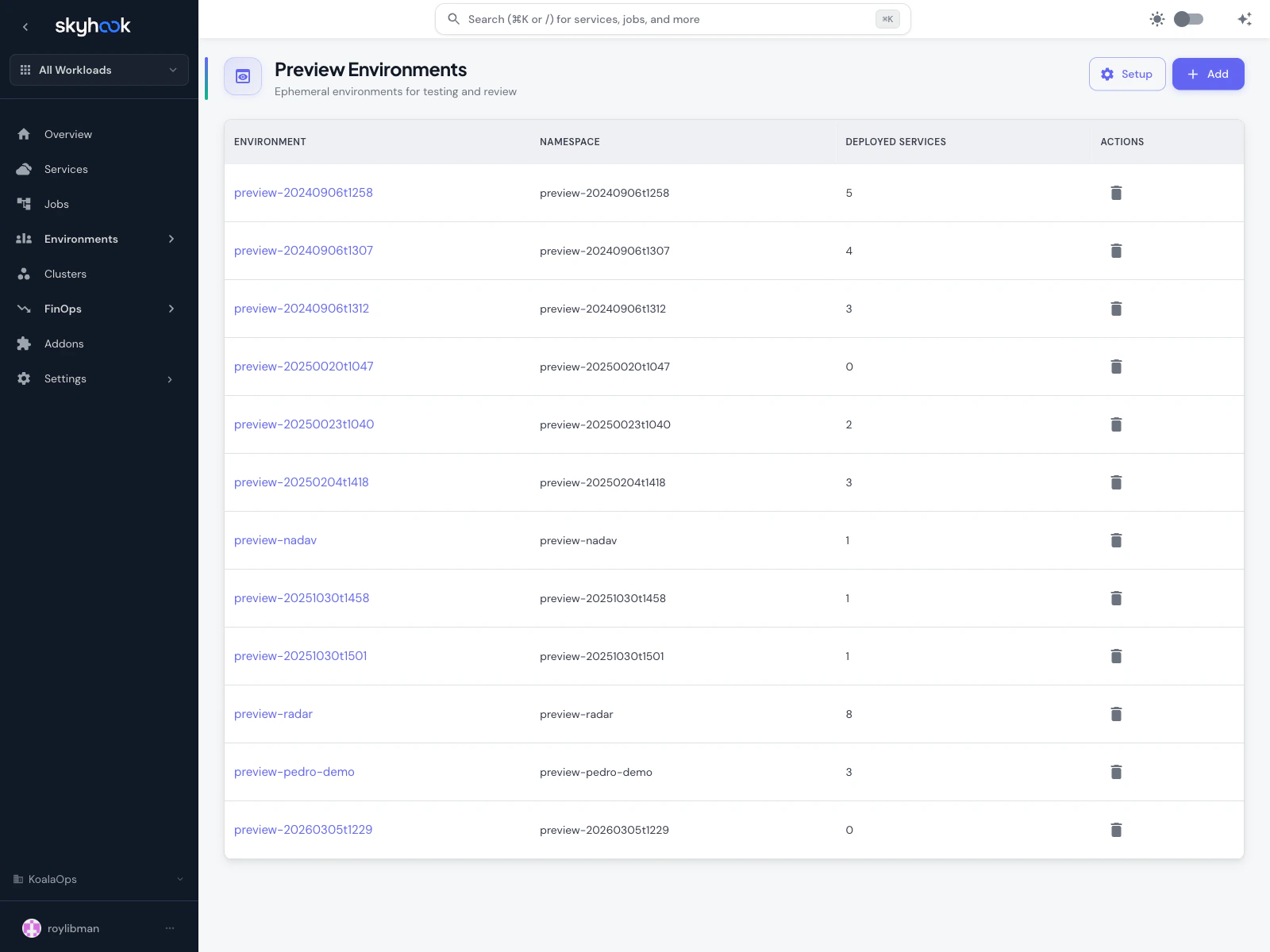
Ephemeral: true flag — static environments never appear here.
Each row shows:
- Environment — the unique identifier (also used as the Kubernetes namespace)
- Namespace — for preview environments, this is always identical to the environment ID
- Deployed Services — how many services are currently running in this environment
- Actions — delete the environment (and optionally its namespace)
Creating a preview environment
Click Add in the top-right of the list. Skyhook shows a compact creation form.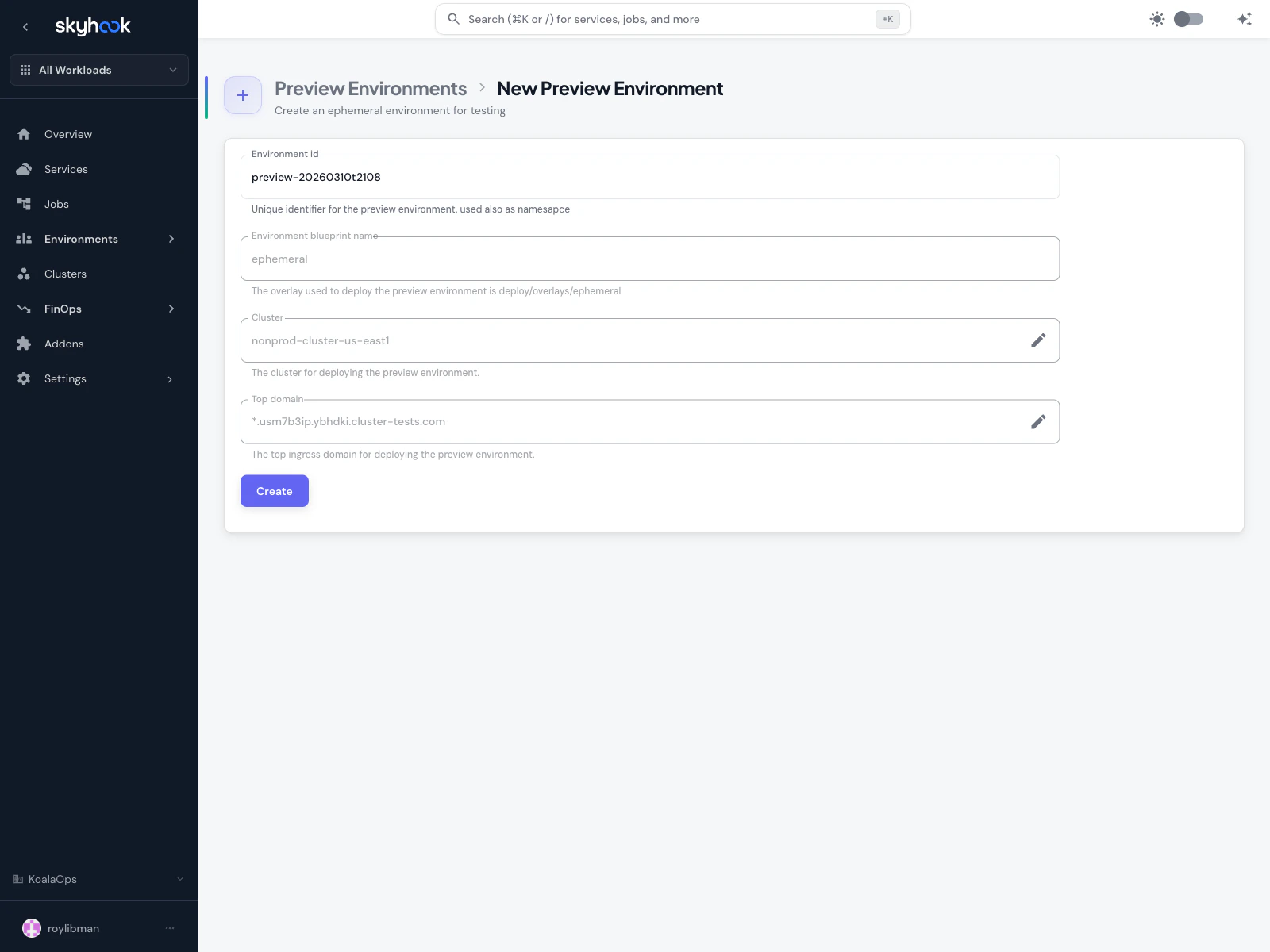
Fields
- Environment id — auto-generated as
preview-<timestamp>. You can change it to something descriptive likepreview-bug-reproorpreview-nadav— it’s used both as the unique ID and the Kubernetes namespace, so keep it DNS-safe. - Environment blueprint name — the name Skyhook uses to reference the ephemeral overlay in your deployment repository. Read-only by default and set to the standard
deploy/overlays/ephemeralpath. - Cluster — the target cluster for the new environment. Org defaults are pre-filled from Settings → Preview Environments.
- Top domain — the ingress domain new services in this environment will use (e.g.
preview-bug-repro.dev.example.com). Defaults to the org’s configured preview domain.
Ephemeral marker. Environments created from this form are flagged as ephemeral, which is what keeps them in the Preview list, excludes them from production readiness monitoring, and will drive future auto-teardown behavior.
Configuration defaults
Preview environments inherit their defaults from Settings → Preview Environments at the org level:- Default cluster — the cluster new previews are created on
- Default top domain — the ingress domain for preview services
- Blueprint path — the overlay path Skyhook templates new environments from (usually
deploy/overlays/ephemeral)
Deploying services to a preview environment
Open any preview environment from the list to reach the deployment page. This is the same interface used for static environments:- Pick the services you want to deploy
- Choose the image tag / branch for each service
- Pick the config branch (defaults to
main, but you can point at a feature branch for bundled testing) - Click Review and Deploy
Env vars and secrets for preview environments
Because previews use the ephemeral overlay, they inherit the base env vars defined on each service — but you can still override per-preview-environment. Two patterns:- Blueprint templates — defined once on the service, applied automatically to every new preview environment
- Environment-specific overrides — set on a specific preview environment after it’s created, visible in the Env Vars & Secrets tab when that environment is selected
Deleting preview environments
Click the trash icon on any row in the preview environments list. Skyhook opens a PR removing the overlay from the deployment repo; ArgoCD prunes the namespace and all resources on sync. Ephemeral namespaces are deleted along with the environment — there’s no risk of leaving an orphaned namespace behind (unlike static environments, which preserve their namespace on removal).Troubleshooting
Preview environment creation succeeds but services won't deploy
Preview environment creation succeeds but services won't deploy
The most common cause is a missing or broken
deploy/overlays/ephemeral overlay in your deployment repository. Open the cluster’s ArgoCD UI from the Addons page and check the application’s sync status. You can also review the pull request Skyhook opened to see the generated manifests before merging.Static environments are showing up in the preview list
Static environments are showing up in the preview list
The list filters to ephemeral environments only. If a static environment is showing here, it was likely created via the API or an older version of Skyhook without the ephemeral marker. Delete and recreate it via the Add form to get it properly marked.
I want previews to auto-delete when idle
I want previews to auto-delete when idle
Automatic teardown of stale preview environments is on the roadmap. For now, use a scheduled workflow to delete previews older than a certain age with zero deployed services.
Further Reading
- Preview Environments: A Game-Changer for Testing and Collaboration - why preview environments transform development workflows