
- Settings → Gateways — Envoy Gateway installation status, gateway classes, and gateway instances across your clusters
- Settings → Certificates — cert-manager installation status and certificate issuers (ClusterIssuer resources)
Gateways
The Settings → Gateways page manages your Envoy Gateway deployment.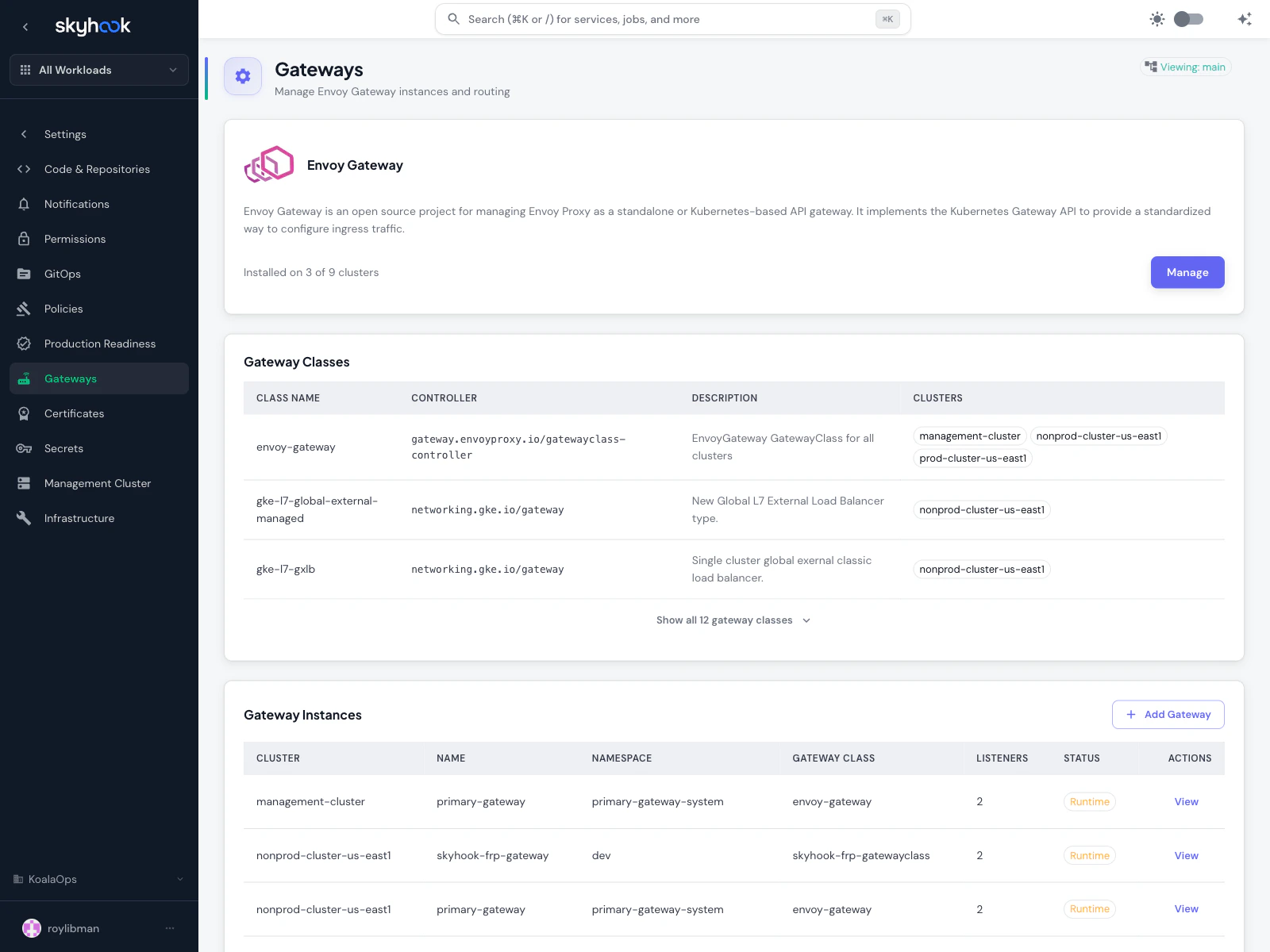
Envoy Gateway installation
At the top, a status banner shows how many clusters have the Envoy Gateway addon installed. Click Manage to install it on additional clusters. Envoy Gateway is an open-source project that wraps Envoy Proxy as a Kubernetes Gateway API controller — it’s what translates Gateway API resources into real traffic routing. Envoy Gateway is the recommended implementation for:- Standardized ingress — one configuration format that works across clusters and cloud providers
- Richer routing than classic Ingress (header-based routing, traffic splitting, gRPC, TCP)
- Multi-team isolation — each team owns its own Gateway without stepping on shared resources
Gateway Classes
A GatewayClass is a cluster-scoped resource that tells Kubernetes which controller should handle a given Gateway. You’ll see one row per gateway class available across your clusters, with:- Class Name — the GatewayClass name
- Controller — the controller that handles this class (e.g.
gateway.envoyproxy.io/gatewayclass-controller,networking.gke.io/gatewayfor GKE-managed) - Description — short summary of the class’s purpose
- Clusters — which clusters this class is available on
gke-l7-global-external-managed), so you can use them alongside Envoy Gateway without manual setup.
Gateway Instances
The table at the bottom lists every Gateway resource in your clusters:- Cluster — which cluster it runs on
- Name — the Gateway name
- Namespace — Kubernetes namespace
- Gateway Class — which class handles this Gateway
- Listeners — how many listeners (ports + protocols) the Gateway exposes
- Status — Runtime status from ArgoCD
Linking a certificate issuer at creation time
When you create a Gateway that needs TLS termination, the form offers an inline picker to link an existing gateway-compatible ClusterIssuer. Selecting one bundles the Gateway creation and the issuer attachment into a single pull request — no two-step process where you create the Gateway first and then go hunting for the issuer config separately.Certificate issuers
The Settings → Certificates page manages cert-manager and its ClusterIssuer resources.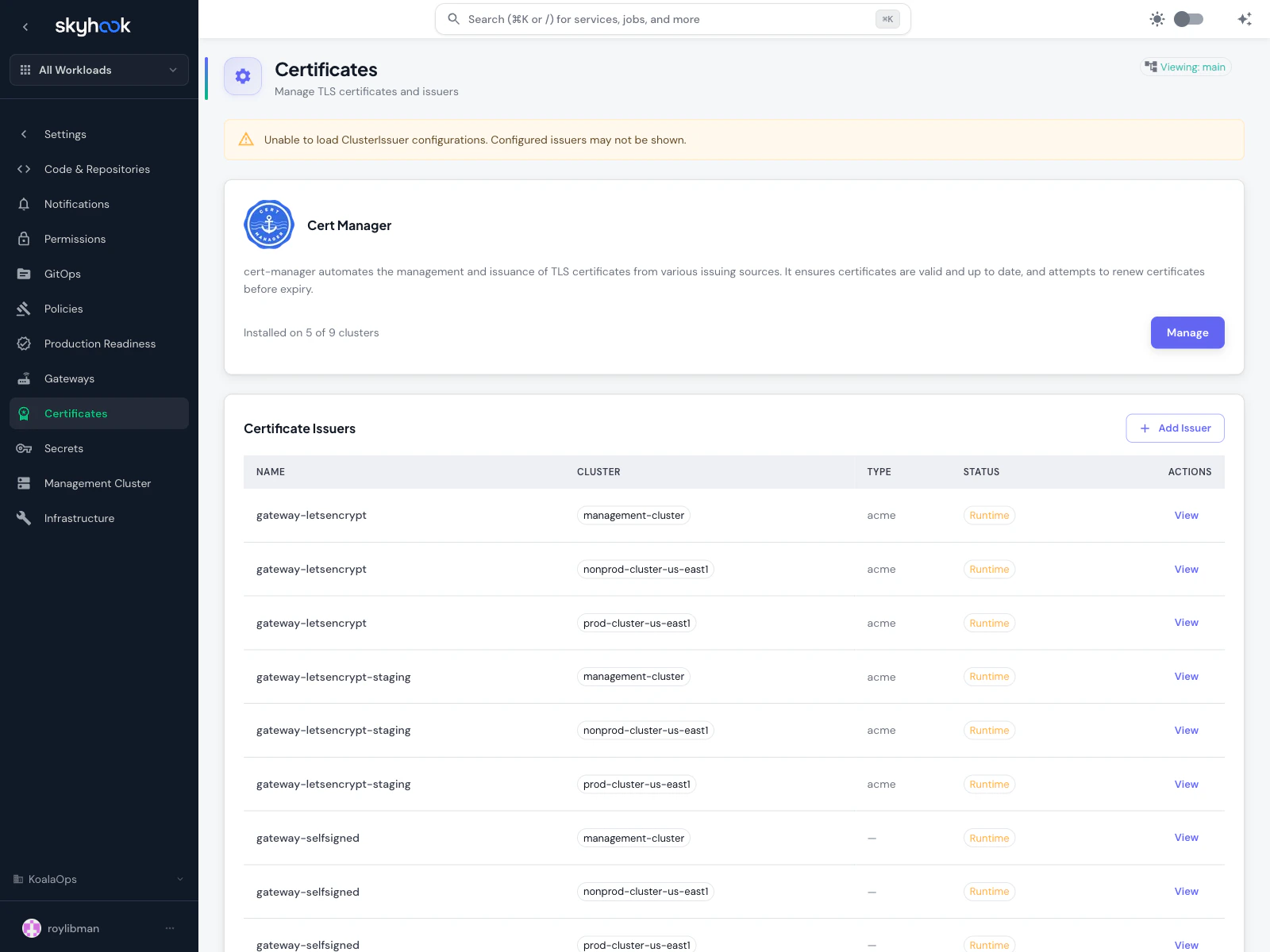
cert-manager installation
At the top, a banner shows how many clusters have cert-manager installed. Click Manage to install it on additional clusters. cert-manager is the standard for automated TLS certificate issuance on Kubernetes — it handles Let’s Encrypt, ACME DNS-01/HTTP-01 challenges, self-signed certificates, private CAs, and more.Certificate Issuers table
The table lists everyClusterIssuer resource across all clusters where cert-manager is installed. Columns:
- Name — the issuer name (e.g.
letsencrypt,letsencrypt-dns01,gateway-letsencrypt,gateway-selfsigned) - Cluster — which cluster the issuer is configured on
- Type — issuer type (ACME for Let’s Encrypt, CA for private CAs, etc.)
- Status — Runtime status from cert-manager
- Actions — View opens the full definition
- Let’s Encrypt (production) — free certificates from Let’s Encrypt’s production endpoint
- Let’s Encrypt (staging) — for testing; hits rate limits gently but issues untrusted certs
- Let’s Encrypt DNS-01 — DNS-based challenge for wildcard certificates
- Self-signed — for internal services and testing
- Gateway-compatible issuers — issuers with the
gateway-*prefix are specifically configured for use with Gateway API resources
Using issuers with Gateways
Gateway-compatible issuers appear in the picker when you create a Gateway that terminates TLS. They’re functionally the same as regular ClusterIssuers but are pre-configured to work with Gateway API’slisteners[].tls.certificateRefs pattern, saving you from having to manually wire a Certificate resource between the issuer and the Gateway.
Typical setup
A minimum viable setup for Gateway API with automatic TLS looks like this:1
Install cert-manager
From Settings → Certificates, click Manage on the cert-manager banner and install it on every cluster that needs TLS certificates.
2
Install Envoy Gateway
From Settings → Gateways, install Envoy Gateway on the clusters that will host your Gateway instances.
3
Create a ClusterIssuer
On the Certificates page, click Add Issuer and configure a Let’s Encrypt production issuer (with DNS-01 if you need wildcard certificates, HTTP-01 otherwise).
4
Create a Gateway
On the Gateways page, click Add Gateway, pick the
envoy-gateway GatewayClass, add a listener for port 443 with TLS, and link the ClusterIssuer you just created.5
Point services at the Gateway
On each service’s Network tab, enable HTTPRoute, pick the Gateway you just created, and define the paths you want to route.
Troubleshooting
'No GatewayClass available' when adding a Gateway
'No GatewayClass available' when adding a Gateway
The cluster you picked doesn’t have any GatewayClass resources. Install Envoy Gateway (or use a cloud-provider GatewayClass like GKE’s) on that cluster first. The form shows a direct link to manage Envoy Gateway when it detects this state.
Certificate issuer shows 'Pending' forever
Certificate issuer shows 'Pending' forever
ACME issuers need to complete a challenge before they’re marked ready. Common causes:
- HTTP-01 challenge — the challenge endpoint isn’t publicly reachable. Check that your load balancer routes the
/.well-known/acme-challenge/*path to the cluster. - DNS-01 challenge — the DNS provider credentials are wrong or don’t have permission to create TXT records.
- Rate limits — Let’s Encrypt production has strict rate limits. Use the staging issuer for testing.
Gateway is Ready but traffic gets 503s
Gateway is Ready but traffic gets 503s
Check three things:
- The HTTPRoute is attached to the Gateway (parentRef matches the Gateway name and namespace)
- The backend Service exists and has healthy endpoints
- The Gateway listener protocol matches your route (HTTPS on 443 vs HTTP on 80)